|
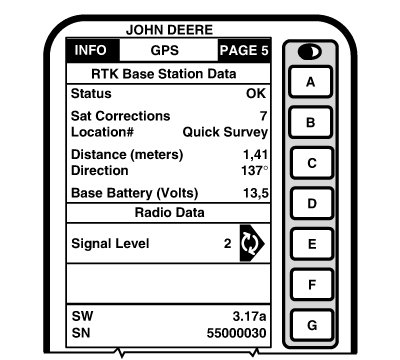
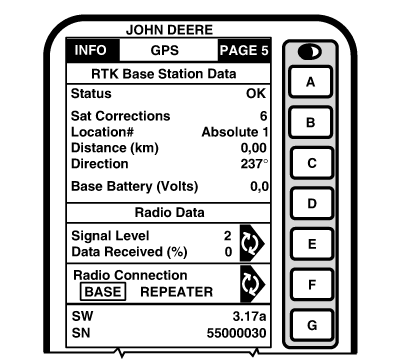
Screen:
INFO - GPS - PAGE 5
This screen allows operator to view:
-
Status
-
OK - Base Station is transmitting correction.
-
No Stored Base - 24 hour self survey is required for current location.
-
Initializing - Receiver is initializing radio, acquiring GPS signal.
-
Self Survey - 24 hour self survey in progress.
-
Sat Corrections
- Indicates number of GPS satellites for which base station is transmitting correction.
-
Distance
- Difference between base station location (known position) and location indicated by uncorrected GPS.
-
Direction
- Direction from base station location (known position) to location indicated by uncorrected GPS.
-
Base Battery (volts)
- Base Station voltage.
|
-
Signal Level
- Level of signal that is detected at radio. The signal level will range from 0 to 100 (-180 dBm to -80 dBm or above). Press E button to refresh signal level.
NOTE:
For Data Received (%): Value less than 100 % indicates an obstruction between base station radio and vehicle radio.
If percent of received correction is 0, and signal level is high, check for potential radio interference sources such as two-way radios, radio towers, etc.
-
Data Received (%)
- Percent of received correction to base station from vehicle.
-
Radio Connection
- Indicates source of correction. If there is no connection, this will toggle between base and repeater.
-
SW
- Version of radio software
-
SN
- Serial number of radio connected to receiver.
|