Accessing GREENSTAR 2 Diagnostic Addresses |
|
|


|
Message Center screen can be reached by pressing MESSAGE CENTER button (showing time) or MENU button then MESSAGE CENTER button (With Info Icon). |
|

JS56696,00005E8 -19-13MAY09-1/4 |
|
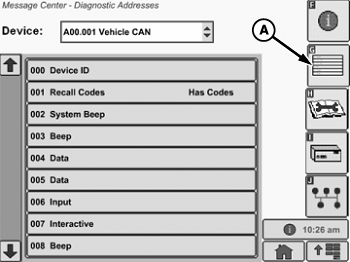
Select Diagnostic Address icon (softkey G) Message center will display all active warning, alert messages and icons.
|
|

JS56696,00005E8 -19-13MAY09-2/4 |
|
Diagnostic Addresses NOTE: Diagnostic addresses are available to access specific diagnostic information. This information can assist the John Deere Dealer in diagnosing problems. Different device controllers can be selected from drop-down box, as shown. Select DIAGNOSTIC ADDRESS button (A). The number of devices available will depend upon machine configuration. The list of addresses can be scrolled up or down with the input device. Selecting an address will show data for that address. Some addresses are not shown until display is in technician mode. Technician Mode : Procedure to get display into Diagnostic Technician Mode: Read all steps before attempting to get display in Technician mode. The steps are time dependent; therefore need to be done in order and timed for successful completion of obtaining technician mode.
There will be a white capital T inside a black box on the right side of the Device drop down box if display is in technician mode. Repeat above procedure if attempt was unsuccessful. Cancelling Technician Mode: |
|
JS56696,00005E8 -19-13MAY09-3/4 |
|
Select Diagnostic Address icon (softkey G) button (A) for 4 seconds and release. This action will take the display out of technician mode. |
JS56696,00005E8 -19-13MAY09-4/4 |