Initial Settings
NOTE: Please refer to the COMPATIBILITY section for components compatible with the GS2 Rate Controller.

PC12235-UN-10SEP09A - Section Valve Type Drop-Down Menu
Select Section Valve type (A) from the drop-down menu. See MAXIMUM NUMBER OF IMPLEMENT SECTIONS table and valve type descriptions. CAUTION: Selecting the wrong valve type can result in valves opening unexpectedly. To avoid injury from exposure to chemicals, verify the correct valve is selected.
IMPORTANT: For PWM and PWM Close systems, it is recommended that an external pump on/off switch is wired into the cab if not already present. This allows the operator to shut off pump. Refer to pump manufacturer’s Operator’s Manual for more information.

PC12236-UN-10SEP09A - Control Valve Type Drop-Down Menu
Select Control Valve type from the drop-down menu. See the following valve type descriptions.NOTE: Valve type must be selected for the system to work. Select Standard, Fast, or PWM for valve configurations with a control valve and separate downstream on/off valve(s). Select Fast Close or PWM Close for valve configurations with one valve that combines control and on/off. Selecting the wrong valve type may result in unexpected behavior and degraded performance.

PC12237-UN-10SEP09
PC12238-UN-10SEP09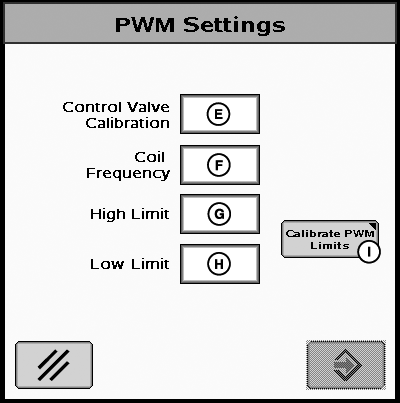
PC12315-UN-06OCT09A - Tank Capacity Input Box
B - Control Valve Calibration
C - Tank Capacity Input Box
D - PWM Setup Button
E - Control Valve Calibration Input Box
F - Coil Frequency Input Box
G - High Speed Limit Input Box
H - Low Speed Limit Input Box
I - Calibrate Limits Button
Enter maximum volume of tank in input box labeled tank capacity.Standard, Fast, and Fast Close Control Valves
Enter the Control Valve Calibration number in the input box (B). Continue to Step 9.
PWM and PWM Close Control Valves
Press the PWM Setup Button (D) and enter the Control Valve Calibration number in the input box (E). Continue to Step 5.
Fine tuning the Control Valve Calibration Number for Optimal Performance.
Use recommended values in Control Valve Calibration table to initially set control valve number. Evaluate machine behavior during operation, and if necessary, adjust value to attain optimum system performance.
The Control Valve Calibration number is a 4 digit number used to fine tune control characteristics. The number is in the form XXYZ, and is defined as follows:
- XX - Valve Speed.
- The higher this value, the quicker the valve responds. If it is set too high, actual flow rate will oscillate continuously around target rate. If it is set too low, target rate will never be reached.
- The higher this value, the quicker the valve responds. If it is set too high, actual flow rate will oscillate continuously around target rate. If it is set too low, target rate will never be reached.
- Y - Output Deadband.
- Sets the minimum speed that the valve will ramp down toward before stopping. The higher this value, the sooner the valve will become stationary.
- Sets the minimum speed that the valve will ramp down toward before stopping. The higher this value, the sooner the valve will become stationary.
- Z - Control Deadband:
- Sets how close actual flow rate must be to target rate to be considered acceptable. When actual and target rates are within this range, the valve will remain stationary. A higher value allows for a larger disparity between actual and target rate.
NOTE: Look for low variance in the lpm (gpm) operating range that the system applies in the field.
Example of tuning the control valve for optimal response:After entering the initial starting value for the control valve (e.g. 2513) and run a configuration test, the variance runs high (at or near 100%) and the valve response seems sluggish. The next step in tuning may be to increase the valve speed number (first 2 digits) from 25 to 35 and also increase the output deadband number (third digit) from 1 to 2 and retry the configuration test. Running a nozzle flow check is also a good way to obtain a better feel for valve speed and response time of the system.
Control Valve Calibration Table
Standard Valve Type
Valve Calibration Number (XXYZ)
RAVEN 165
2513
RAVEN 894
2513
RAVEN 125
2513
TEEJET 344B
1003
HARDI
7051
Fast Valve Type
Valve Calibration Number (XXYZ)
RAVEN 177
0753
Fast-Close Valve Type
Valve Calibration Number (XXYZ)
RAVEN 177
0753
PWM Valve Type
Valve Calibration Number (XXYZ)
Sauer Danfoss Hagie MFG T540
1533
Command Controls Corporation FV1501
1411
PWM-Close Valve Type
Valve Calibration Number (XXYZ)
Sauer Danfoss Hagie MFG T540
1533
Command Controls Corporation FV1501
1411
NOTE: On a RAVEN valve, the last three numbers of the model number are used to identify the valve type (Example: RAVEN XXX894).
- XX - Valve Speed.
Enter the Coil Frequency for the PWM/PWM Close valve in input box (F). Refer to control valve manufacturer’s Operator’s Manual to attain the proper Coil Frequency value.
Define PWM Limits to control the minimum/maximum desired flow or pressure to prevent machine damage and ensure quick system response. Defining limits can be done by manually entering the high and low limits into the input boxes (G & H) or by using the Calibrate PWM Limits Test (I). The high and low limits range is 0-255. See Calibrate PWM Limits Test in the Tests Section for details on how to perform the test.
PC12240-UN-29OCT09Initial System Settings
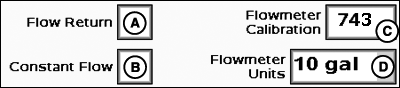
A - Flow Return Enable/Disable
B - Flowmeter Calibration Input Box
C - Constant Flow Enable/Disable
D - Flowmeter Units Drop-Down Menu
Enter Flowmeter Calibration number as stamped on valve.Most flowmeters have an attached tag indicating the recommended calibration number. Enter this number as the initial Flowmeter Calibration value. The Calibrate Flowmeter test must be run to attain a more accurate flowmeter calibration number (see Calibrate Flowmeter test).
NOTE: If the tag is no longer attached, start with a low calibration number such as 60. Conduct a Calibrate Flowmeter test, and the system will adjust the value accordingly.
Choose unit of measurement from flowmeter units drop-down.
NOTE: The number on the RAVEN tag is pulses per 10 units of fluid. Ensure the 10 gal / 10 L unit is used.
Flow Return— A Flow Return option is available for liquid systems equipped with a positive displacement pump. With this feature selected, the Rate Controller will open a flow return valve whenever all section valves are closed in order to reduce system pressure. The flow return valve will remain closed if one or more section valves are open. Refer to the TROUBLESHOOTING section to determine which driver numbers and connector pins are associated with the flow return valve.
Constant Flow— Select the Constant Flow check box to configure the Rate Controller to operate with section valves that have a continuous flow bypass. Steps for calibrating section bypass valves are described in the SECTION TEST section of this manual.
NOTE: Constant Flow is only available with 2-wire section valve type.
PC11320-UN-23SEP08Initial System Settings
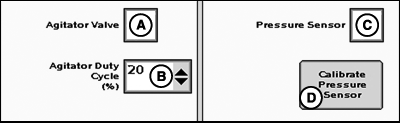
A - Agitator Valve Enable/Disable Box
B - Agitator Duty Cycle Drop-Down Menu
C - Pressure Sensor Enable/Disable Box
D - Calibrate Pressure Sensor Button
Check the agitator valve box to enable agitator.NOTE: Agitator valve selection may reduce the number of implement sections the GS2 can control. See maximum number of implement sections table.
Set agitator duty cycle percent from drop-down menu. Agitation Rate is based on runtime in ten minute intervals. Example: at 20% agitator runs for 2 minutes and is off for 8 minutes.
If the tank volume is at or below 20% of the total volume of the tank the agitation will reduce to half the set run time. Example: at the 20% setting from the example above, the agitation will now run for 1 minute and is off for 9 minutes.
Check the pressure sensor box if sensor is installed. Pressure indicator will be displayed on main menu instead of flow rate when pressure sensor is checked.
To calibrate pressure sensor, select button and follow on screen instructions. See Test section for details.
JS56696,00006FD-19-20091103 |