Calibrate Flowmeter
PC12262-UN-14SEP09
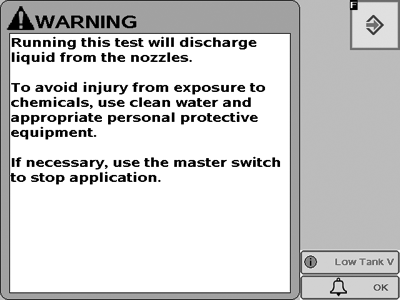
 CAUTION: Running this test will discharge liquid from the nozzles.
To avoid injury from exposure to chemicals, use clean water and appropriate personal protective equipment.
If necessary, use the master switch to stop application.
This message will be displayed when any diagnostics test is selected on sprayer or liquid fertilizer applications that will discharge liquid.
- Configure the control valve and flowmeter in Setup.
- Go to "GS2 Rate Controller—Setup" screen and select "System" tab.
NOTE: Master switch must be off to enter data.
Enter the recommended Control Valve Calibration value.- Enter the default Flowmeter Calibration value as provided by the manufacturer.
NOTE: The number on the RAVEN tag is pulses per 10 units of fluid. Ensure the 10 L / 10 gal unit is used.
- Select Calibrate Flowmeter from the tests drop-down menu.
- Be sure the flowmeter is clean.
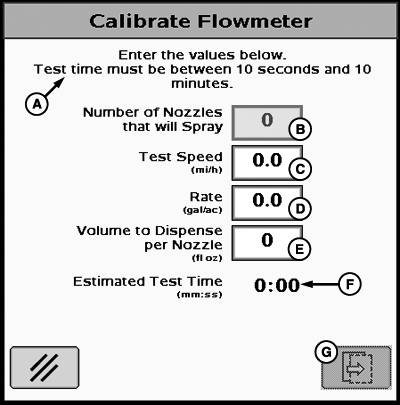
PC12264-UN-15SEP09A - Enter the values below. Test time must be between 10 seconds and 10 minutes.
B - Number of nozzles that will spray
C - Test Speed
D - Rate
E - Volume to dispense per nozzle
F - Estimated test time
G - Next Page
Enable the sections to spray and select the Calibrate Flowmeter button.IMPORTANT: Always fill the solution tank with clean water to do a proper calibration test.
- Enter calibration test parameters.
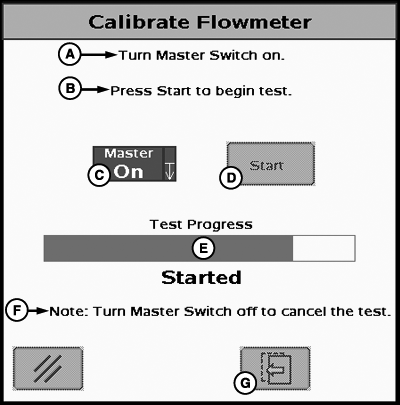
PC12324-UN-07OCT09A - Turn Master Switch ON.
B - Select Start to begin test.
C - Master Switch Indicator
D - Start Button
E - Test Progress
F - Note: Turn Master Switch OFF to cancel the test.
G - Previous Page
Turn Master Switch on, start test, and collect samples.- Ensure sample containers are properly positioned.
- Turn the Master Switch on.
- Select the "Start" button on the screen
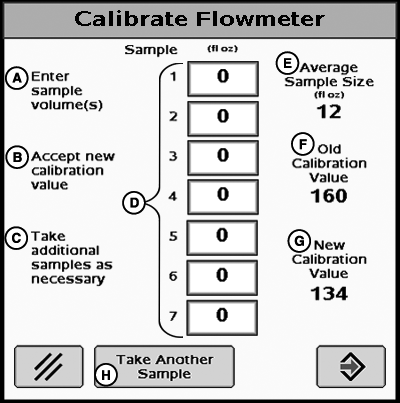
PC12325-UN-07OCT09A - Enter Sample Values
B - Accept New Calibration Value
C - Take additional Samples As Necessary
D - Sample Amounts
E - Average Sample Size
F - Old Calibration Value
G - New Calibration Value
H - Take Another Sample
Enter the collected sample volumes on the popup screen.- Enter the measured amounts collected from each container.
- If fewer than 7 samples were collected, leave remaining values set to 0.
- Select "Take Another Sample" if additional samples are desired.
- Repeat steps 4—7 as necessary.
- If it is desired to collect samples from other sprayer sections and/or nozzles in order to further confirm test results, select the cancel button and repeat steps 4—7.
- If it is desired to collect samples from other sprayer sections and/or nozzles in order to further confirm test results, select the cancel button and repeat steps 4—7.
- Accept new calibration value.
- Select the accept button to accept the New Calibration Value.
- Select the accept button to accept the New Calibration Value.
- Turn Master Switch OFF at any time to cancel test.
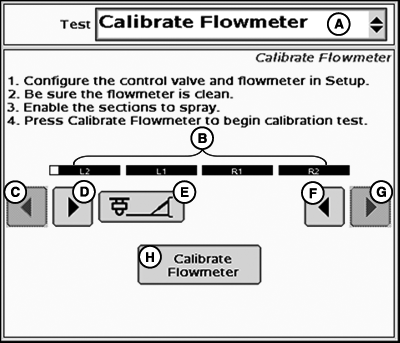
PC12323-UN-07OCT09
Calibration Test
A - Tests Drop-Down Menu
B - Enabled Sections
C - Left Sections Off
D - Left Sections ON
E - Left Fence Row Nozzles
F - Right Sections ON
G - Right Sections OFF
H - Calibrate Flowmeter
Place containers (such as calibration container) under up to 7 nozzles to capture volumes sprayed during the test. Only 7 samples may be entered into the sample volumes popup screen. Calibrating Flowmeter may be repeated as many times as needed if all nozzles are to be tested. By measuring these samples and entering the values into the system, an accurate flowmeter calibration value can be attained. Follow the on-screen instructions as described.
JS56696,0000715-19-20091030 |