Calibrate Pressure Sensor
PC12317-UN-06OCT09
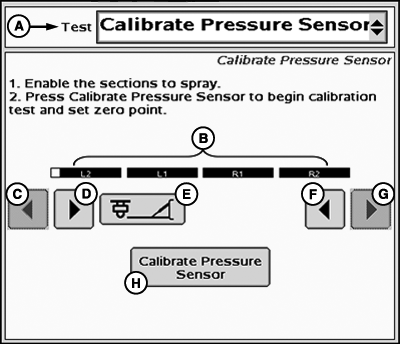
Calibrate Pressure Sensor
A - Tests Drop-Down Menu
B - Enabled Sections
C - Left Sections Off
D - Left Sections ON
E - Left Fence Row Nozzles ON/OFF
F - Right Sections ON
G - Right Sections OFF
H - Calibrate Pressure Sensor
- Enable the section to spray.
- Press Calibrate Pressure Sensor to begin calibration test and set zero point.
PC12273-UN-16SEP09
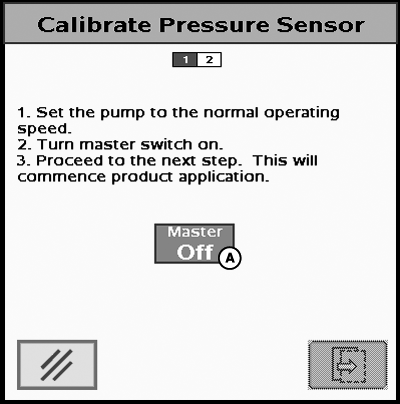
Calibrate Pressure Sensor
A - Master Switch Indicator
- Set the pump to the normal operating speed.
- Turn master switch on.
- Proceed to the next step. This will commence product application.
PC12274-UN-16SEP09
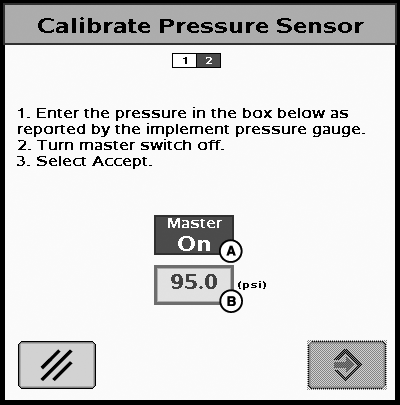
A - Master Switch Indicator
B - Pressure Input Box
- Enter the pressure in the box below as reported by the implement pressure gauge.
- Turn master switch off.
- Select Accept.
NOTE: The system will spray for 30 seconds maximum. Once the system has stabilized the value from the gauge, it must be entered during this period of time.
JS56696,000071B-19-20091030 |