Implement Offsets
PC11838-UN-20MAR09
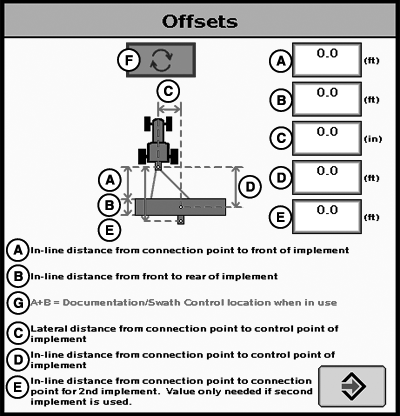
Offsets
A - In-line distance from connection point to front of implement.
B - In-line distance from front to rear of implement.
C - Lateral distance from connection point to control point of implement.
D - In-line distance from connection point to control point of implement.
E - In-line distance from connection point to connection point for second implement. Value only needed if second implement is used.
F - Offset Toggle Button
G - A+B Documentation/Swath Control location when in use.
Press CHANGE OFFSET button on Implement Setup screen.
Implement name must be defined to save implement offsets.
Implement Offsets—Used to define the actual implement position relative to the machine.
Control Point—The location around which the implement rotates.
Enter Implement Offsets:
- A) In-line distance from connection point to front of implement. On pull-type implements, think of this as the tongue. This would be the distance from the connection point to the first point of ground engagement (front ranks of field cultivator, seed drop point on a planter). For planters with a 2-pt mount, measure from where the planter pivots just behind the 2-pt.
- B) In-line distance from front to rear of implement. On ground engaging tools, this is the distance from the front rank of sweeps or points to the rear rank. On a standard pull type sprayer, this offset would be 0 and the sprayer has nozzles at the same point along the boom.
- C) Lateral distance from connection point to control point of implement. This is the lateral distance from the center of the machine to the center of the implement, which will be 0.0 for most common implements.
NOTE: Examples of equipment that will not be centered include most split row planters with an even number of 38 cm (15 in.) rows, (Examples: 1790 12/24, 16/32 CCS, 24R15 or 32R15) unless using an adjustable hitch crossbar.
For the implements listed, it is required to enter an implement offset dimension C on the implement offset page. By entering implement offset dimension C, iGuide will make the necessary adjustments for the system to perform accurately.
Another example of this scenario is a planter with a 2-pt hitch offset of 19 cm (7.5 in.) to the right. This planter must have an offset of 19 cm (7.5 in.) entered for dimension C on the implement offsets page.
NOTE: When using an adjustable hitch crossbar, a lateral offset for the machine and implement is needed.
- D) In-line distance from connection point to control point of implement. In many cases, this distance will be from the connection point to the carrying wheels. For proper turns, measure this distance with implement at the height it typically will be at while in the lower position. For planters with a 2-pt mount, measure from where the planter pivots just behind the 2-pt.
- E) In-line distance from connection point to connection point for second implement. Value only needed if second implement is used.
See MACHINE IMPLEMENT DIMENSIONS section.
PC11072-UN-29FEB08
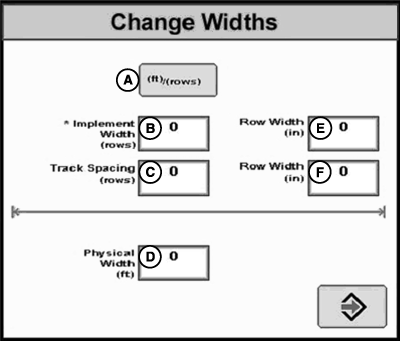
Change Widths
A - Toggle Button
B - Implement Width Input-Box
C - Track Spacing Input-Box
D - Physical Width Input-Box
E - Row Width Input-Box
F - Row Width Input-Box
Change Widths—Used to enter implement width and track spacing for guidance. Change implement width and track spacing when changing implements. Implement width and track spacing are independent of each other.
NOTE: IMPLEMENT tab will show HEADER for Combines, ROW UNITS for Cotton Pickers, and BOOM for Sprayer.
NOTE: Implement width may come from certain controllers such as SeedStar.
Defining Implement Width and Track Spacing. Implement Width and Track Spacing can be defined two ways: enter the working width of the implement, or enter the number of rows and the row spacing. To toggle between these two, press the cm (ft)/(rows) button (A).
Implement Width cm (ft)/(rows)—enter total implement working width or the number of rows and row spacing distance.
This value is used to calculate total area when documenting the operation.
Track Spacing—Used in guidance for how far each pass is from the last pass. It is entered the same way as Implement Width. For “perfect” guess rows, this distance will be the same as Implement Width. To ensure some overlap for tillage or spraying, or to account for some GPS drift, you may choose to make the Track Spacing somewhat less than the Implement Width.
Physical Width—The actual width of the entire implement when being used in the field when the implement is raised. It is sometimes larger than Implement Width.
NOTE: Physical Width is not used for Implement Guidance.
There are certain value constraints to make Implement Guidance work - refer to APPENDIX - Valid Configuration.
JS56696,0000503-19-20090402 |