Implement Setup
Implement 1 Tab
MENU > GREENSTAR2 PRO > EQUIPMENT > IMPLEMENT tab

PC8663-UN-05AUG05
MENU button

PC8661-UN-02NOV05
GREENSTAR2 PRO button

PC8677-UN-05AUG05
EQUIPMENT button
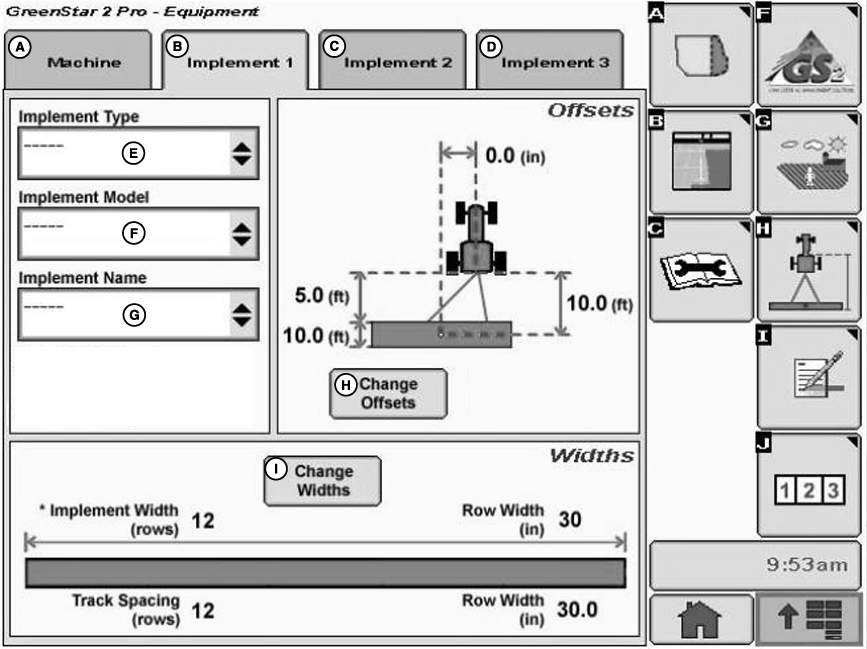
PC10779-UN-01NOV07
Implement Tab
A - Machine Tab
B - Implement 1 Tab
C - Implement 2 Tab
D - Implement 3 Tab
E - Implement Type Drop-Down Menu
F - Implement Model Drop-Down Menu
G - Implement Name Drop-Down Menu
H - Change Offsets Button
I - Change Widths Buttons
Select the Change Offsets button (H).
NOTE: All items and changes will be saved under the current implement name.
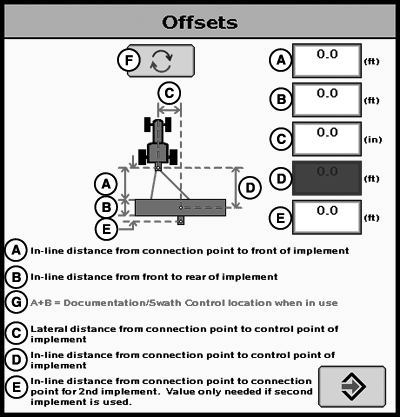
PC11405-UN-15OCT08
Implement Offsets
A - In-line distance from connection point to front of implement.
B - In-line distance from front to rear of implement.
C - Lateral distance from connection point to control point of implement.
D - In-line distance from connection point to control point of implement.
E - In-line distance from connection point to connection point for second implement. Value only needed if second implement is used.
F - Offset Toggle Button
G - A+B = Documentation / Swath Control location when in use.
Verify/Enter implement: Type, Model, and Name in drop-down menus.
Implement name allows user to save implement dimensions.
Implement Offsets—Used to define the actual implement position relative to the tractor. This is important for ensuring the implement is lined up to the field at the end of turns and in determining where the implement is for the Minimize Skips and Minimize Overlaps feature (see Change Settings on Machine tab).
- A) In-line distance from connection point to front of implement. On pull-type implements, think of this as the tongue. For more precision, it is actually the dimension from the pinbolt to the front side of where the work gets done (front ranks of field cultivator, seed drop point on a planter). For planters with a 2 pt. mount, measure from where the planter pivots just behind the 2 pt.
- B) Working Length of the implement. On ground engagement tools, this is the distance from the front rank of sweeps or points to the rear rank. On a standard planter or pull type sprayer, this dimension would be 0 - the seed is dropped at the same point on every row, and the sprayer has nozzles at the same point along the boom. Dimension (A) would then need to extend to the location of the seed drop point or sprayer boom. On a spreader, (A+B) is the drop point of the product. Refer to manufacturer’s implement OM for this value.
- C) Lateral distance from connection point to control point of implement. This is the lateral distance from the center of the tractor to the center of the implement, which will be 0.0 for most common implements. This dimension is used to alert the operator to potential collisions. This is critical for proper end-turn performance and may need to be adjusted.NOTE: Examples of equipment that will not be centered include mower conditioners and most split row planters with an even number of 38 cm (15 in.) rows, (e.g. 24R15 or 32R15) unless you have an adjustable hitch crossbar.
- D) In-line distance from connection point to control point of implement. In many cases, this distance will be from the connection point to the carrying wheels. For proper turns, measure this distance with implement at the height it typically will be at while turning.NOTE: These dimensions may need to be adjusted for fine-tuning performance in the field.
NOTE: For 3 pt mounted implements, dimension (D) does not need to be entered.
- A = 3.8 m (12.6 ft)
- B = 0 m (0 ft) - even though it is physically 2 m (6.8 ft)
- C = 0 m (0 feet)
Typical Planter Setup—JD 1770 16R30 NT planter with a 2 point connection
- A = 3 m (9.9 ft)
- B = 5 m (16.4 ft)
- C = 0 m (0 ft)
Typical Disk Setup—JD 637 F 10.8 m (35.5 ft) disk setup
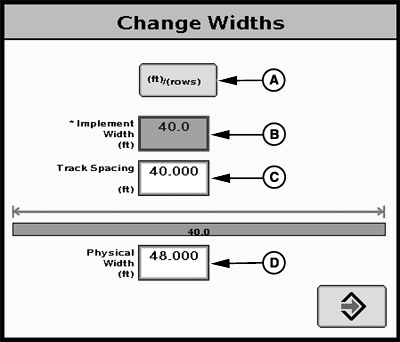
PC9902-UN-09JAN07
Track Spacing
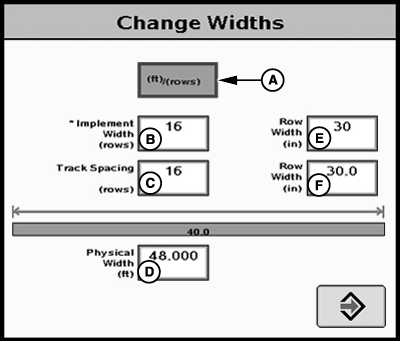
PC9903-UN-09JAN07
Track Spacing
A - m (ft)/(rows) button
B - Implement Width
C - Track Spacing
D - Physical Width
E - Row Width
Implement Widths—Used to enter implement width and track spacing for guidance. This value is also used to calculate total area when documenting the operation. Verify implement type, model, name, implement width and track spacing when changing implements. Implement width and track spacing are independent of each other.
NOTE: IMPLEMENT tab will show HEADER for Combines, ROW UNITS for Cotton Pickers, and BOOM for Sprayer.
NOTE: Implement width may come from controller on select controllers such as SeedStar.
NOTE: In some cases, a higher degree of precision can be achieved for track spacing when track spacing is entered in by rows instead of feet. More decimal places are used in the track spacing calculation when entered in by rows versus the three decimal places allowed when entered by feet.
Defining Implement Width and Track Spacing. Implement width and track spacing can be defined two ways: enter the working width of the implement, or enter the number of rows and the row spacing. To toggle between these two, select the m (ft)/(rows) button.
- Implement Width m (ft)—enter total implement working width
- Implement Width rows—enter number of rows and the row spacing in inches
Track Spacing—Used in guidance for how far each pass is from the last pass. It is entered the same way as Implement Width. For “perfect” guess rows, this distance will be the same as Implement Width. To ensure some overlap for tillage or spraying, or to account for some GPS drift, you may choose to make the Track Spacing somewhat less than the Implement Width.
Physical Width—The actual width of the entire implement when being used in the field when the implement is raised. It is sometimes larger than Implement Width.
Using a planter as an example, the marker arms and blades are wider than the working width. This width needs to be entered if markers are not used, or are used and completely folded on the ends. If markers are only partially folded during turns, enter this larger dimension.
IMPORTANT: Width measurements are used to help alert an operator of potential intersections between the implement and an impassable boundary. The operator still needs to be aware of potential collisions if there are times the implement is wider than the dimension entered (e.g. marker arm lowered). If markers are used in the field, add the width of both markers to give ultimate alarms of possible intersections.
NOTE: As a buffer to avoid obstacles, additional Physical Width may be added to the implement to compensate for several things, one of these being GPS drift.
Physical Width Table
Signal | Approximate Physical Width added to Implement |
RTK | 0.6 m (2 ft) |
SF2 | 0.9 m (3 ft) |
SF1 | 3.4 m (11 ft) |
PC9945-UN-05FEB07
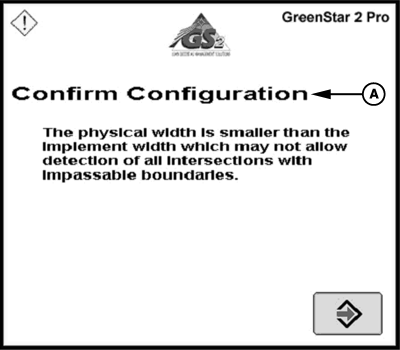
Confirm Configuration
A - Confirm Configuration—The physical width is smaller than the implement width which may not allow detection of all intersections with impassable boundaries.
NOTE: If the physical width is less than the implement (working) width, a message will appear as a reminder that this is not usually correct (A 16R30 planter is physically wider than its 12.2 m (40 ft) working width). An example where the working width is wider than the physical width is a dry fertilizer spreader—it spreads much farther than the physical width of the buggy.
Implement 2 and Implement 3 tab
PC11400-UN-14OCT08
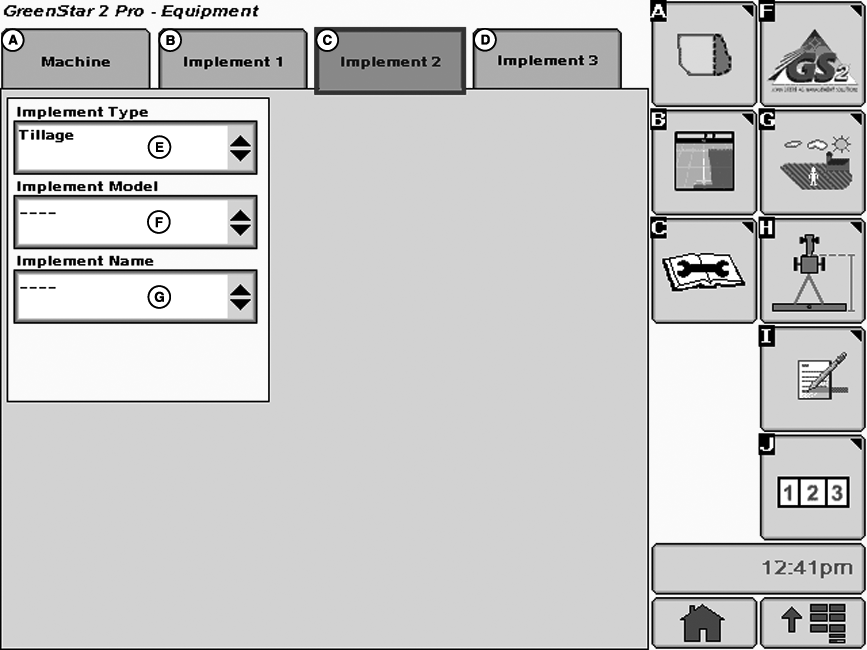
IMPLEMENT 2 tab
A - MACHINE tab
B - IMPLEMENT 1 tab
C - IMPLEMENT 2 tab
D - IMPLEMENT 3 tab
E - IMPLEMENT TYPE drop-down box
F - IMPLEMENT MODEL drop-down box
G - IMPLEMENT NAME drop-down box
The IMPLEMENT 2 and IMPLEMENT 3 tabs are primarily used for logging hours against the equipment.
For IMPLEMENT 2 tab to appear, an implement type must be selected in IMPLEMENT 1 tab
IMPLEMENT 2 tab allows setup of following:
- Implement Type—Used to select implement type
- Implement Model—Used to distinguish between different models
- Implement Name—Used to distinguish multiple machines of the same model
NOTE: Implement widths or offsets can not be defined for Implement 2 or 3.
For IMPLEMENT 3 tab to appear, implement type must be selected in IMPLEMENT 2 tab.
IMPLEMENT 3 tab allows setup of the following:
- Implement Type—Used to select implement type
- Implement Model—Used to distinguish between different models or multiple machines or the same model
- Implement Name—The name is used to further clarify which implement is being used.
NOTE: Implement widths or offsets can not be defined for Implement 3.
JS56696,0000379-19-20090930 |