Boundary Screen
MENU >> GREENSTAR 2 PRO >> MAPPING >> BOUNDARIES tab

PC8663-UN-05AUG05
MENU Softkey
PC8661-UN-02NOV05
GREENSTAR2 PRO Softkey

PC8672-UN-05AUG05
MAPPING Softkey

PC10632-UN-15JUL08
Boundaries tab
NOTE: Apex is not available in all EAME countries.
- Client (set up in Apex or as Custom Name)
- Farm (set up in Apex or as Custom Name)
- Field (set up in Apex or as Custom Name)
- Type
- Headland Group
- Creation Method
- Headland Indicator
- Name
- Passable/Impassable Check Box (for Interiors)
- Boundary Offset
- Boundary Map
- Recording
The boundary screen allows operator to set up the following information:
NOTE: Client, Farm, and Field can also be created on screen by selecting NEW from the drop-down menu.
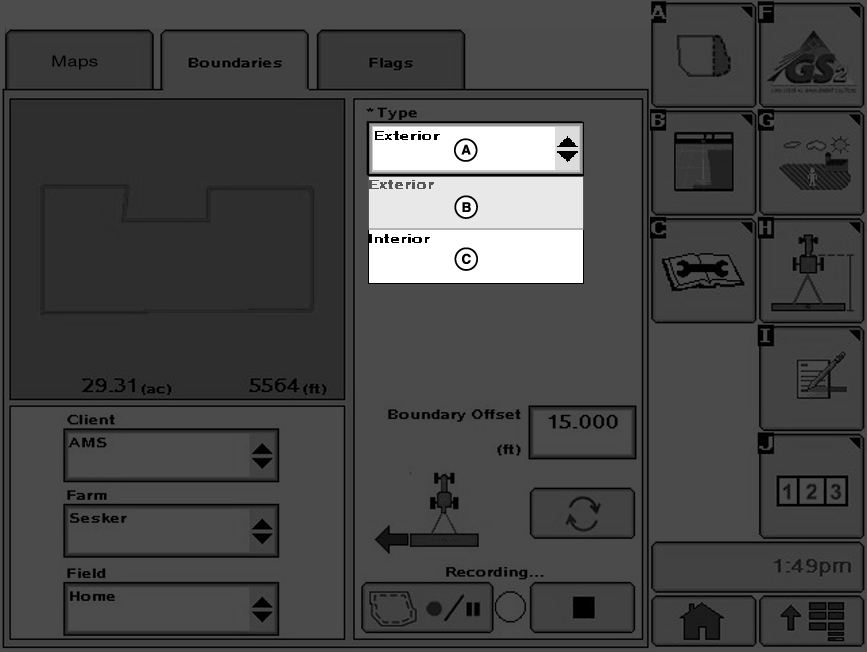
PC10633-UN-10OCT07
A - Boundary Type Drop-Down Menu
B - Exterior Boundary
C - Interior Boundary
Exterior Boundary (required)— The perimeter of the field.
Exterior Headland (required)— The end rows along the sides of the field where the end-turns occur.
Boundary type can be changed to HEADLAND when either an exterior or interior boundary has been selected. If one of these is selected, the screen changes to the following screens.
NOTE: The defined Headlands need to be large enough for vehicle and implement to turn around without the use of brakes.
Passable Interior Boundary— The perimeter of an area inside the field which is not farmed, but can be crossed with the vehicle and implement (e.g. waterway).
Impassable Interior Boundary— The perimeter of an area inside the field which is not farmed, and cannot be crossed with the vehicle and implement.
Interior Headland— The end rows or turn rows around an Impassable Interior Boundary.
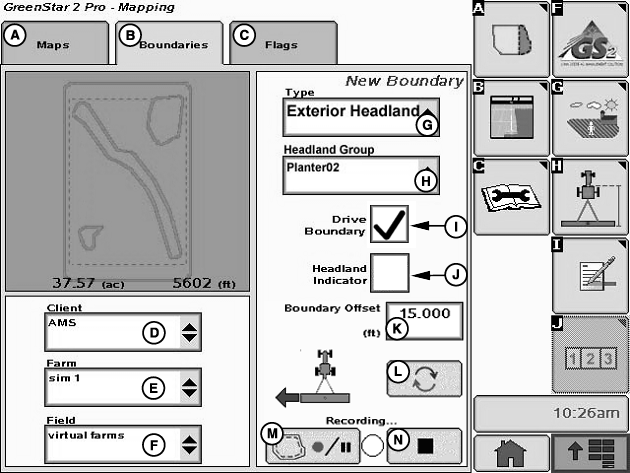
PC10499-UN-10SEP07
Boundaries with Driven Exterior Headland Boundary
A - Maps Tab
B - Boundaries Tab
C - Flags Tab
D - Client Drop-Down Menu
E - Farm Drop-Down Menu
F - Field Drop-Down Menu
G - Type Drop-Down Menu
H - Headland Group Drop-Down Menu
I - Drive Boundary Check-Box
J - Headland Indicator Check-Box
K - Boundary Offset Input-Box
L - Receiver Offset Toggle
M - Record/Pause
N - Stop Recording
Headland Group— A combination of one or more related headland boundaries. Different operations may use different headland groups. For instance, there may be a Planter group where the headlands are 36.6 m (120 ft), and a Field Cultivator group where the headlands are 27.4 m (90 ft). Different field operations can require different headlands.
JS56696,0000495-19-20090511 |