Overlap Control
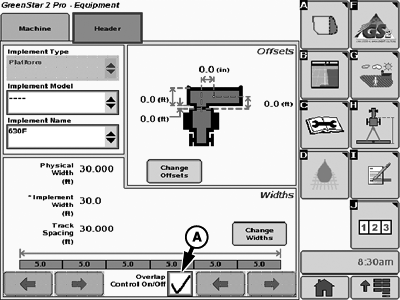
PC10857IL-UN-25MAR09
A - Overlap Control Check Box
NOTE: When using Overlap Control, header width is divided into sections automatically with a maximum of eight sections and a minimum section width of 1.5 m.
Overlap Control automatically adjusts the width of the header as the harvester moves over areas that have already been harvested. This feature improves the accuracy of the area and yield data.
Platform | |
|---|---|
Platform Width | Number of Sections |
Less than 6.1 m (20 ft) | 3 |
6.1 — 7.3 m (20 — 24 ft) | 4 |
7.6 — 8.8 m (25 — 29 ft) | 5 |
9.1 — 10.4 m (30 — 34 ft) | 6 |
10.7 -11.9 m (35 — 39 ft) | 7 |
12 m (40 ft) and greater | 8 |
Row Crop Head | |
|---|---|
Row Spacing | Rows per Section |
38 cm (15 in.) | 4 |
51 cm (20 in.) | 3 |
76 cm (30 in.) | 2 |
Overlap Control is turned on by checking the box on the Header setup screen. When it is turned on, the manual controls for changing the header width are disabled.
Overlap Control ensures that harvested area does not extend over or out of field boundaries or extend into an interior boundary.
- Exterior boundary—only one exterior boundary can be defined for a field.
- Interior boundaries—multiple interior boundaries can be defined and named for a field.
Boundaries, though optional, can be helpful when using Overlap Control. For example, an exterior boundary can help ensure there is no area outside of the field is included in the yield calculation if a section of the head or platform extends over the boundary. Similarly, an interior boundary allows you to drive across a waterway and help ensure that each section is off while crossing.
- If a boundary is unloaded into desktop software, it can either be set up on the display in the field, or in the desktop software and saved to the card. If interior boundaries are used, those fields must also have an exterior boundary.
- If data is not unloaded into desktop software, and interior boundary can be created on the display without having an exterior boundary.
OUO6050,000107A-19-20090901 |