Using Documentation with a Dry Box/SpreadStar

PC8663-UN-05AUG05
MENU button
PC8661-UN-02NOV05
GREENSTAR2 PRO button

PC8678-UN-05AUG05
DOCUMENTATION softkey
MENU button >> GREENSTAR2 PRO button >> DOCUMENTATION softkey
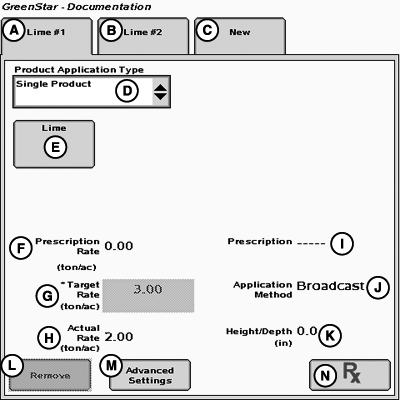
This screen allows operator to setup and change product application when GS2 system is connected to a dry box.
Client, Farm, Field, and Task information must be setup to run documentation for the dry box.
PC10857VI-UN-31MAR10
A - Product #1
B - Product #2
C - New Product (#3)
D - Product Application Type
E - Product Type
F - Prescription Rate
G - Target Rate
H - Actual Rate
I - Prescription
J - Application Method
K - Height/Depth
L - Remove Button
M - Advance Settings
N - Prescription Button
Product Application tabs are automatically generated when GS2 system is hooked up to dry box controllers.
The first Product Application tab (A) is used to set up Bin - 1.
The second Product Application tab (B) is used to set up Bin - 2.
If the machine is equipped with only one bin the second tab will not show up.
Button (C) allows the operator to document additional product.
Button(D) selects between a single product and tank mix.
Button (E) allows the operator to input information on the product that is being applied.
Location (F) displays rate that is currently written in the prescriptions.
Button (G) displays the rate that is currently being commanded by the controller.
Location (H) displays the rate that is physically being applied to the field.
Location (I) displays the name of prescription if one is selected.
Location (J) displays the application method selected using the advanced settings, button (M).
Location (K) displays the Height/Depth and is selected using the Advanced Settings button (M).
Button (L) is disabled while connected to dry box controller.
Button (M) is used to added details.
Button (N) is used to select prescription or convert shapefile to a prescription.
PC9716-UN-13NOV06
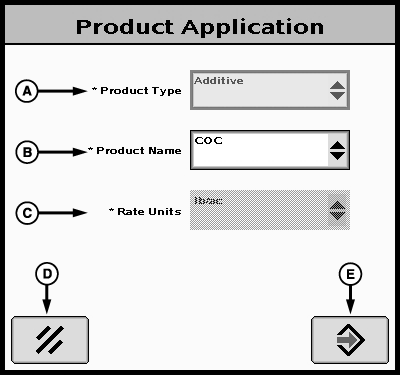
Product Application screen
A - Product Type
B - Product Name
C - Rate Units
D - Cancel button
E - Enter button
Pressing the Product Setup button, shown on previous page, will bring up the Product Application screen. This screen allows the operator to change Product Type or Product Name. Rate Units are set on lb./ac. and can not be changed when using a dry box.. Pressing the Enter button (E) will save changes and return operator to the GreenStar2 Pro - Documentation screen. Pressing the Cancel button (D) will return the operator to the GreenStar2 Pro - Documentation screen without making any changes.
OUO6050,00022CB-19-20100331 |