Operating Mode
IMPORTANT: Before starting SETUP procedures, enter RTK activation number, see Enter RTK Activation section.
NOTE: Radio can function in six different modes:
- Vehicle
- Quick Survey Base Mode
- Absolute Base Mode
- Vehicle Repeater
- Repeater
- Off
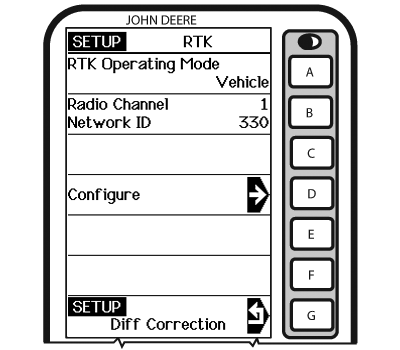
PC12080-UN-13MAY09
SETUP - RTK
A - RTK Operating Mode
B - RTK Radio Channel
Network ID
C - —
D - Configure
E - —
F - —
G - Return to Differential Correction
Screen: SETUP - RTKPress: SETUP >> StarFire 3000 >> DIFF CORRECTION SETUP >> RTK SETUP
Press letter button next to RTK OPERATION MODE and toggle to desired selection.
Suggested Base Station Mode For Operation
Quick Survey Base Mode | Absolute Base Mode |
Custom Operations | Drip Tape |
Tillage | Strip Till |
Broad-acre Seeding | Controlled Traffic |
Row Crop |
Vehicle Mode: Select for receiver on vehicle.
Vehicle Repeater Mode: This mode should only be used in situations where multiple RTK vehicles are operating in the same field and due to the terrain, line-of-sight is obstructed between one of the vehicles and the base station.
Quick Survey Base Mode: Select if exact location of guidance tracks do not need to be stored for future applications. If Quick Survey Base Mode is used to establish rows or paths that will be used at a later date, location of Track 0 must be saved using Current Field setting in Tracking Setup (see AutoTrac Operator’s Manual). When Current Field is recalled, a one-time use of Shift Track feature will be needed to align vehicle on previous tracks. See Setup Quick Survey Base Mode section.
NOTE: Quick Survey Base Mode requires a 15 minute self survey to be conducted on location before first use.
Absolute Survey Base Mode: Select if exact location of guidance tracks need to be stored for future guidance applications without relying on visual reference for track position to align using Shift Track feature. Track 0 must be stored using Current Field in Tracking Setup in order to follow previously used tracks. Absolute Base Mode requires 24-hour self survey to be conducted on location before first use. After survey is completed, base station will then transmit corrections. If base station is moved to another position and then returned to original surveyed position, it is very important that base station is mounted in exact same position. Any difference between original surveyed position and mounted position will result in offset of corrected position. For this reason, it is important to mount receiver to a fixed position like building or post mounted in concrete.
OFF Mode: This mode disables all RTK functionality in receiver. RTK Operating Mode must be OFF for normal SF2 operation on SF2 licensed receiver.
JS56696,00007F4-19-20100415 |