Implement GPS Offsets
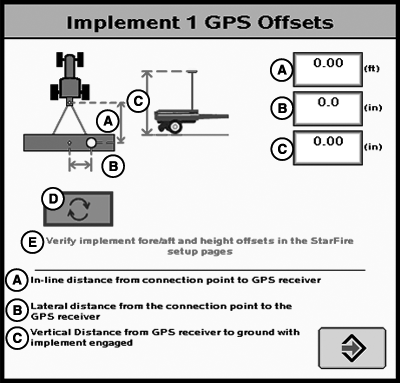
PC11841-UN-23MAR09
GPS Offsets
A - In-line distance from connection point to GPS receiver.
B - Lateral distance from implement center to GPS receiver.
C - Vertical distance from GPS receiver to ground with implement engaged.
D - Lateral offset toggle button
E - Verify implement fore/aft and offsets in the StarFire setup pages.
Press GPS OFFSET button on Implement Setup screen. This button will only be active if an implement GPS receiver is connected to the CAN Bus.
Enter Implement GPS Offsets:
IMPORTANT: Drive a vehicle forward and have the vehicle & implement in a straight line before measuring and calculating these dimensions. This is very important for accurate measurements.
IMPORTANT: Values must be accurate because they will be used to calculate the track for implement guidance and documentation.
NOTE: Minor adjustments to dimension B on the Implement 1 GPS Offsets page can result in measurable changes in off-track error performance. When modifying this value, minor increment changes 1 cm (0.5 in.) is recommended.
There are certain value constraints to make iGuide work - refer to APPENDIX—VALID CONFIGURATION.
CZ76372,00001D0-19-20101006 |