Accessing GS2 / GS3 Diagnostic Addresses

PC8664-UN-05AUG05
MESSAGE CENTER button (showing time)

PC8663-UN-05AUG05
MENU button

PC8655-UN-05AUG05
MESSAGE CENTER button (With Info Icon)
Message Center screen can be reached by pressing MESSAGE CENTER button (showing time) or MENU button then MESSAGE CENTER button (With Info Icon).

PC8668-UN-05AUG05
DIAGNOSTIC ADDRESSES softkey (G)
Select Diagnostic Address icon (softkey G)
Message center displays all active alarm messages.
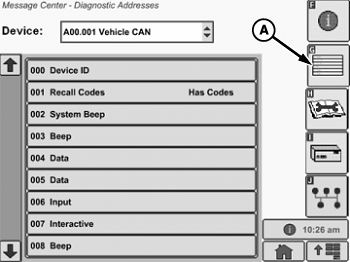
PC8643-UN-07DEC05
Diagnostic Address Main Screen
A - Diagnostic Address icon (softkey G)
Diagnostic Addresses
NOTE: Diagnostic addresses are available to access specific diagnostic information. This information can assist the John Deere Dealer in diagnosing problems. Different device controllers can be selected from drop-down box, as shown.
Select DIAGNOSTIC ADDRESS button (A). The number of devices available depends upon machine configuration. The list of addresses can be scrolled up or down with the input device. Selecting an address shows data for that address.
|
BA31779,000013F-19-20110425 |