ACTIVATIONS tab
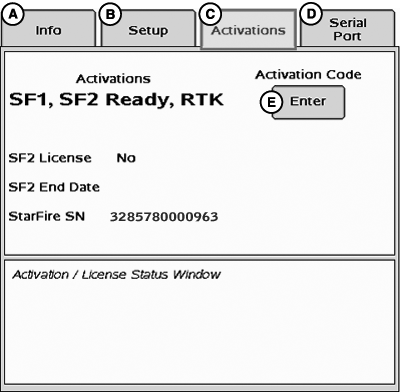
PC12045-UN-14MAY09
StarFire 3000 - Main—Activations tab
A - Info tab
B - Setup tab
C - Activations tab
D - Serial Port tab
E - Activation Code Enter button
ACTIVATIONS tab contains the following:
-
Valid activations for receiver:
- SF1 – activated on every StarFire 3000.
- SF2 Ready – receiver must be SF2 Ready or an upgrade to SF2 ready from SF1 World Solution must be purchased.
- RTK – activated with valid RTK activation (requires receiver to be SF2 Ready).
-
SF2 License: Displays status of receiver's SF2 License.
- Yes-Enabled – A valid SF2 license exists and SF2 is the differential correction mode selected.
- Yes-Disabled – A valid SF2 license exists, but SF2 is not the differential correction mode selected.
- No – Appears when no valid SF2 license exists or SF2 license has expired.
- SF2 End Date: Displays date at which SF2 License expires.
- StarFire SN: StarFire serial number
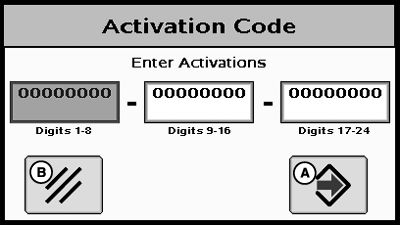
PC9708-UN-10NOV06
Activation Code
A - Enter button
B - Cancel button
Activation CodeNOTE: Activation Codes are required to obtain SF2 Ready and RTK Activations, and SF2 license subscription.
ENTER button is used to enter 24-digit codes for SF2 Ready and RTK Activations, SF2 license subscription, and deactivation codes for transferring all StarFire activations and licenses.
-
Upon selecting ENTER button, an Activation Code box appears
with three input boxes.
NOTE: If more than 8 digits are entered into an input box, “99999999”
appears. Reselect box and type only 8 digits into input box.
- Select first input box labeled Digits 1-8 and enter first 8 digits of 24-digit code.
- Select second input box labeled Digits 9-16 and enter second 8 digits of 24-digit code.
- Select third input box labeled Digits 17-24 and enter last 8 digits of 24 digit code.
- Press ENTER button.
- A confirmation message appears when the 24-digit code is valid and entered correctly.
Deactivation Code input
Deactivation Code input appears when a deactivation code has been entered following previous procedure. It displays 6-digit deactivation codes for SF2 License, SF2 Ready, and RTK activations. These codes are needed when transferring activations or licenses to another receiver.
Activation/License Status Window
Displays messages when SF2 License has expired and provides user with option to use a Grace Period.
NOTE: Three 24 hour Grace periods are available when the current license expires. Grace periods are provided to allow sufficient time to renew a license. Grace period signal is SF2 differential correction signal.
Using a Grace Period
- Select USE 1 button from status window
- Select YES button
|
DK01672,000019F-19-20110926 |