Machine Setup
MENU >> GREENSTAR 3 PRO >> EQUIPMENT allows access to MACHINE and IMPLEMENT setup screens.

PC8663-UN-05AUG05
MENU Softkey

PC12685-UN-14JUL10
GREENSTAR 3 PRO button

PC8677-UN-05AUG05
EQUIPMENT Softkey
Machine Tab
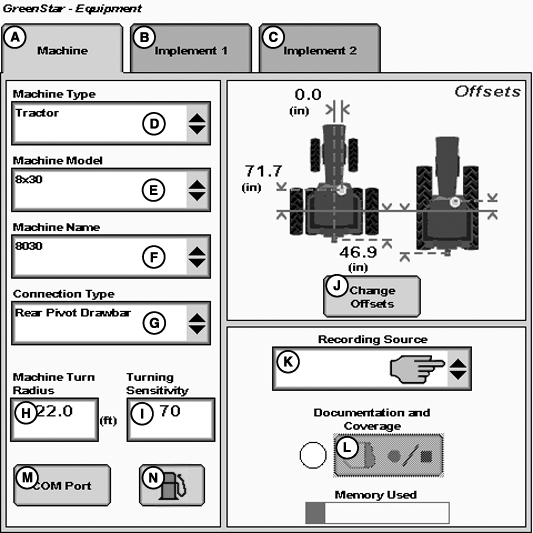
PC13268-UN-28APR11
Machine Tab
A - Machine Tab
B - Implement 1 Tab
C - Implement 2 Tab
D - Machine Type Drop-Down Menu
E - Machine Model Drop-Down Menu
F - Machine Name Drop-Down Menu
G - Connection Type Drop-Down Menu
H - Machine Turn Radius Input-Box
I - Turning Sensitivity Input-Box
J - Change Offsets Button
K - Recording Source Drop-Down Menu
L - Record/Pause Button
M - COM Port Button
N - Fuel Button (Business Pack/Europe Only)
NOTE: All items and changes will be saved under the current machine name.
NOTE: Offsets are provided by some ISO implements and some Deere tractors. Some list boxes may be grayed out when the machine is automatically recognized.
The Machine and Implement tabs are required to be populated with equipment information such as:
- Type
- Model
- Name
- Offsets
Machine Type—Vehicle type being used (e.g. Tractor, Combine, Sprayer).
Machine Model—Model number of the vehicle being used. For John Deere vehicles, model numbers will be available from the drop down list.
Machine Name—The name is used to further clarify which machine is being used. For instance, if there are two 8430’s in your operation, the machine names may be “John” and “Deere”, or “8430-1” and “8430-2”, or simply “1” and “2”. However, settings pertaining to the tractor such as turning radius, turn sensitivity, dimensions, etc. are stored to the name.
PC9890-UN-05FEB07
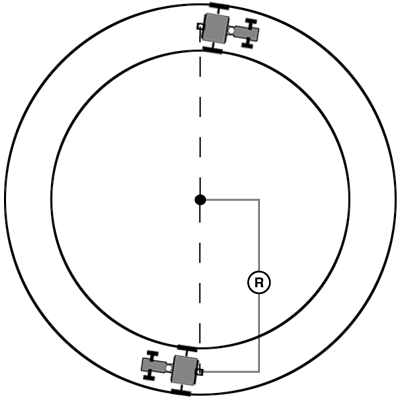
Machine Turn Radius
R - Machine Turn Radius
NOTE: Machine Turn Radius and Turning Sensitivity are for use with iTEC Pro only.
Machine Turn Radius—How sharp the machine can turn without an implement attached and without applying brake pressure. The turn radius is half the diameter as measured at the center of the rear axle of a row crop tractor, and the pivot point on tracks and 4WD tractors. Example: 8030 wheel tractors have a minimum turn radius of 6.1—6.7 m (20—22 ft). Choose a number to start with and change as needed for accuracy.
Turning Sensitivity—AutoTrac gain setting when the vehicle is in an automated turn. This is adjustable by the operator to improve performance (default 70).
Verify proper dimensions correspond to the Machine selected.
NOTE: Not all recording sources are available for all machines.
Machine Offsets
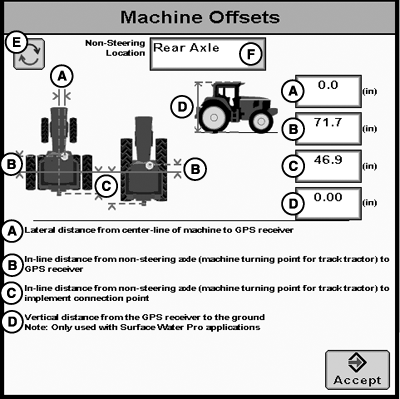
PC13269-UN-28APR11
Machine Offsets
A - Lateral distance from center-line of machine to GPS receiver
B - In-line distance from non-steering axle to GPS receiver
C - In-line distance from non-steering axle to connection point
D - Vertical distance from GPS receiver to the ground
E - Offset Toggle Button
F - Non-Steering Axle Location Drop-Down Menu
Press CHANGE OFFSETS button on Machine Setup screen.
Offsets are used to eliminate skips or overlaps due to an offset receiver.
To enter machine offsets:
- Select input box.
- Enter amount of offset in cm/in. using numeric keypad and select enter button.
- Select the receiver toggle button to move the offset to the right or left of cab center.
If no receiver offset is required, then RECEIVER OFFSET input box should read 0.
Machine offsets:
- A) Lateral Distance from center-line of machine to GPS receiver.
- B) In-line distance from non-steering axle to GPS Receiver.
- C) In-line distance from non-steering axle to connection point. The connection point is where the tractor connects to the implement (drawbar, hitch) except on 2 pt pivoting implements (large planter). In this case, measure the distance back to the pivot point immediately behind the hitch.
- (D) Vertical distance from GPS receiver to the ground.
NOTE: Offset (D) is for use with Surface Water Pro.
|
CZ76372,000013B-19-20110614 |