Map Based Prescriptions
Prescriptions
Application Plans from desktop software can be applied using selected implement control units.
Map-based prescriptions are compatible with the following equipment:
- SeedStar Generation II (gray Boxes on planter frame) (1900 carts PIN 690101 and higher, and all 1910 carts) with Variable Rate Drives. Application Plans can be in seeds per hectare (acre).
- SeedStar 2 planters with Variable Rate Drives
- Gen2 1900 and 1910 model air carts with variable rate drives and SeedStar 2 air carts with variable rate drives. Air Carts must have Variable Rate Drives. Application Plans must also be created with mass or weight units (ex. kilograms/hectare or pounds/acre). Application plans cannot be in liquid or seed count form. Multiple prescriptions can be applied simultaneously by creating an operation for each tank.
- Task control unit compliant implements
- Sprayers and SprayStar Gen IV
-
3rd-Party Controllers: Ensure that accurate data is recorded
by setting control unit rate units equal to Application Plans. 3rd-Party
Controllers compatible with the following list of variable rate control
units:
- Raven 440, 450, 460, 660
- SideKick
- GreenSeeker
- Rawson Accu-Rate and Accu-Plant
- New Leader Mark III and Mark IV
- LH Technologies
- GreenStar Rate Controller
NOTE: 3rd-Party control units are control units using RS232 connection (Field Doc Connect) and ISOBUS compliant control units supporting Task Controller functionality.
NOTE: Depending on capability of control unit; seed, dry product and liquid can be applied.
NOTE: It is not possible to run prescriptions of two seperate ISO implements or two Field Doc Connect implements. However it is possible to run prescriptions for multiple operations performed by a single implement (multiple operation implement).
Setup Prescriptions

PC8676-UN-05AUG05
RESOURCE/CONDITIONS button

PC8677-UN-05AUG05
EQUIPMENT button

PC8678-UN-05AUG05
DOCUMENTATION button

PC8704-UN-17AUG05
PRESCRIPTIONS button
Client, Farm, Field, and Task Setup
NOTE: See GreenStar 3 Basics and Pro General Setup, RESOURCES and CONDITIONS button for more information on setting up Client, Farm and Field.
-
Select RESOURCE and CONDITIONS button.
-
Select or Enter Client, Farm, Field, and Task.
-
Select EQUIPMENT button.
-
Setup recording source and implement width.
-
Select DOCUMENTATION button.
-
Choose an operation type. Example seeding or product application.
-
Select PRESCRIPTIONS button.
-
Select the PRESCRIPTION from the PRESCRIPTION drop-down box.
Prescription Multiplier
IMPORTANT: If using John Deere sprayer, rate knob must be set to AUX.
If using John Deere AirCart or Planter, set desktop software as Active Rate.
If using a 3rd-Party control unit, see the operator manual of the control unit.
NOTE: 3rd-Party control units are control units using RS232 connection (Field Doc Connect) and ISOBUS compliant control units supporting Task Controller functionality.
If applying multiple prescriptions, operator must choose a prescription for each operation. Example—air cart with a prescription for each tank.
If applying the same product from two of more tanks, operator needs a prescription for each tank.
Prescription Override or Multiplier
Select a rate to override the prescription.
Increase or decrease the prescription rate by 15%. All rates in the prescription are adjusted by 15%.
Select ENTER button.
Prescription Overview Background Layer
Map Setting Tab
The operator can select the prescription map as the background layer in the map settings page when a prescription is being applied. Aerial images can also be used as a background layer. As applied data will show over the prescription layer as it is recorded.
To select the prescription as a background layer:
Select: GREENSTAR 3 PRO > MAPPING > MAP SETTINGS
Then choose from the from the BACKGROUND drop-down menu.
For more information on Maps refer to the Maps section of this operator's manual.
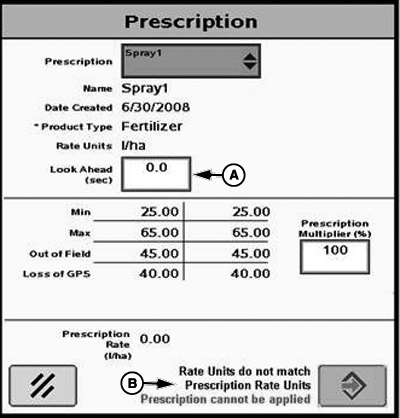
PC10857QW-UN-14SEP09
A - Look Ahead (Seconds)
B - Text with Accept button
In the Look Ahead input box (A), enter the number of seconds to look ahead for prescription rate changes. This is an adjustment to compensate for the delay between the control unit making the rate change and the solution pump responding. This should be between 0 and 4 seconds. Default is 0.0 seconds.NOTE: Text (B) will be displayed and the accept button will become inactive when prescription base units do not match, i.e. liquid units vs. weight units or gallons vs. pounds. Correcting the base unit measurement mismatch will allow the prescription to be applied.
To convert prescription shapefiles, select “Shapefile” from the drop-down menu and select the enter button. This will take you to the Shapefile Conversion Homepage.
|
CZ76372,00002B4-19-20110330 |