Overlap Settings
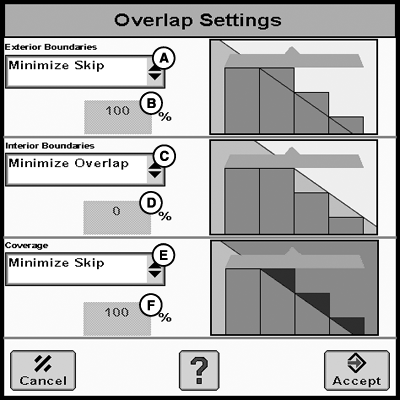
PC13240-UN-14APR11
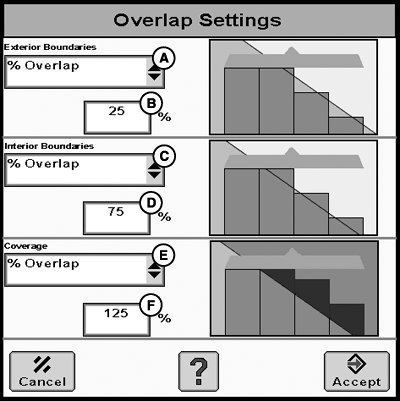
PC13241-UN-14APR11
A - Exterior Boundaries Drop-Down Menu
B - Exterior Boundaries Percent Input Box
C - Interior Boundaries Drop-Down Menu
D - Interior Boundaries Percent Input Box
E - Coverage Drop-Down Menu
F - Coverage Percent Input Box
The system can be configured to operate in three modes:
- Minimize Skip
- Minimize Overlap
- Percent Overlap
Minimize Skip ensures product coverage up to field boundaries, interior boundaries, and as applied area reducing skips. Minimize Skip can result in over application and is 100% overlap.
Minimize Overlap ensures that product coverage does not extend over or out of field boundaries. It also ensures that product coverage does not extend into an interior boundary. This setting could cause skips along field boundaries or interior boundaries depending on the angle a boundary is crossed. Minimize Overlap can result in under application and is 0% overlap.
Percent Overlap allows settings from 0-125% Overlap. Percentages between 0-100% ensures product coverage into previous covered area or outside of field boundaries based upon individual section widths. To achieve increasing amounts of overlap, utilize the Percentage Overlap between 100-125%. Each percentage point above 100% accounts for one additional foot of overlap. This allows the operator to achieve desired results and prevent skips by creating intentional overlap.
NOTE: It is not recommended to utilize the Turn on and Turn off times to achieve intentional overlap: this may cause additional system complications.
|
HC94949,0000052-19-20120508 |