Understanding Section Control Turn On and Turn Off Settings
NOTE: The Turn on and Turn off times in the examples in this section are not true for every machine. It is important that you determine the Turn on and Turn off times for your particular machine and implement.
Section Control operates based on the drop point and turn on and off time of the primary function.
Seeding Tools
Planters and air seeding tools average 6—12 km/h (4—7 mph) while planting and have minimal machine electrical clutch reaction delay times (under 0.8 seconds usually). The largest delay time is usually from the time the seed leaves the meter disk, travels in the seed tube, and reaches the soil. At a 10 km/h (6 mph) planting speed, you travel 2.8 m (8.8 ft.) in one second. That's 280 mm (10.5 in.) of travel distance every one-tenth of a second. (Example - Entire seed delay time from the switch being selected in the cab, the clutch stops, the seed meter stops, and all the seed has reached the soil; time elapsed 0.8 seconds) You can see that changing 0.3—0.8 seconds on the look ahead time can dramatically change the location of your seed placement when turning on or turning off. On average, most row-crop planters generally set a turn off time to 0.3 seconds and a turn on time between 0.5—1.0 seconds. On average, most air carts set turn on and off times between 2–6 seconds, depending on the air seeding tool configuration and the product being applied. Smaller tools usually have lower turn on and off times, while larger tools may require larger turn on and off times.
On ranked tools (seeding tools with multiple ranks), set the Section Control settings for Minimize Skip (100% overlap). Section Control maps to the rear rank on the tool so the Turn on time must be increased to account for rank spacing. See figure at the end of this section.
The goal is to compensate for Rank Delay spacing by entering ranked turn on for the “Turn on” setting. Turn on + Rank Delay = Ranked Turn On. Maintain a constant turn around speed to keep the Turn On time accurate. Examine and adjust the settings before planting.
NOTE: Ranked Delay is a time, not a distance, and affects speed.
Sprayers
At 24 km/h (16 mph) in a self-propelled sprayer, if the average physical reaction time of the system (turn off command at the multifunction control handle, the boom valve reacts and turns off, liquid flows out of the boom freely until the check valve pressure is met) is 2.5 seconds. The liquid continues to fall to the crop canopy past the 2.5 seconds; therefore, the physical overall operational reaction time could be approximately 3.0 seconds in total.
To determine the Turn on time for a sprayer, press the master on switch and measure the amount of time until you see the product hit the crop. To determine your Turn off time, shut the master off switch and measure the amount of time until you see product stop flowing.
As a rule of thumb, it takes a liquid handling system longer to react when turning on than when turning off due to liquid pressure differentials. The turn on time is often slightly greater than the turn off time. Keep in mind that your ground speed only affects the distance traveled while the machine reaction delay is taking place. Also keep in mind the distance traveled varies between turn on and turn off times and from operator to operator.
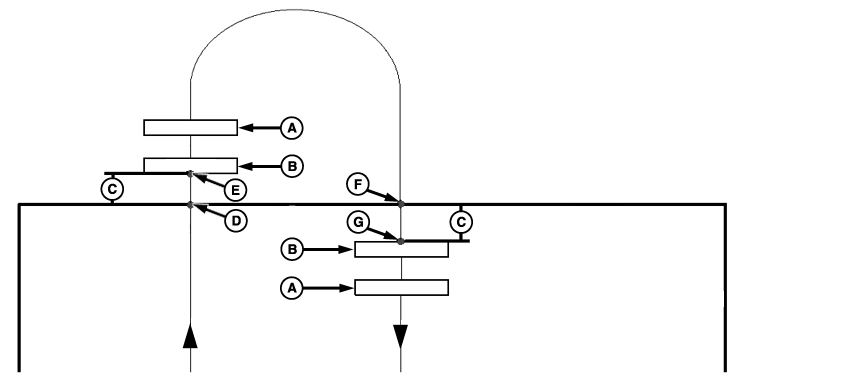
PC10857WT-UN-07JUN10
NO SECTION CONTROL—Two Ranked Tools Entering Then Leaving Headland
A - Rank 1
B - Rank 2
C - System Delay
D - Switch Off
E - Actual Off
F - Switch On
G - Actual On
System Delay = Overlap (A) and Overlap (B)
System Delay = Overlap (A) and Overlap (B)
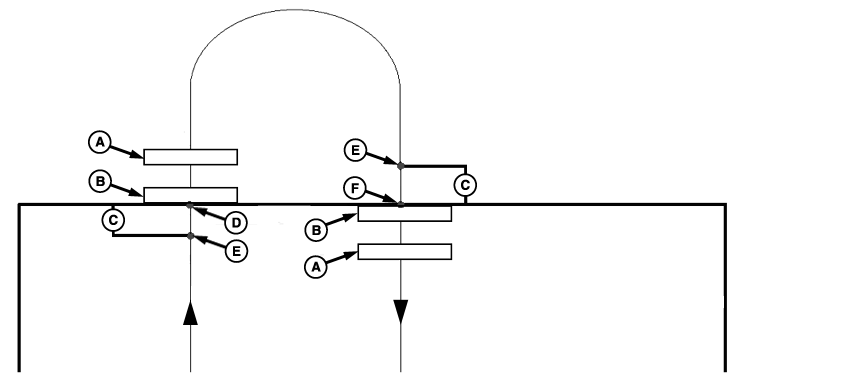
PC10857WU-UN-07JUN10
NORMAL SECTION CONTROL—Two Ranked Tools Entering Then Leaving Headland
A - Rank 1
B - Rank 2
C - System Delay
D - Actual Off
E - Section Control Command
F - Actual On
System Delay = No Overlap (A) and No Overlap (B)
System Delay = Overlap (A) and No Overlap (B)
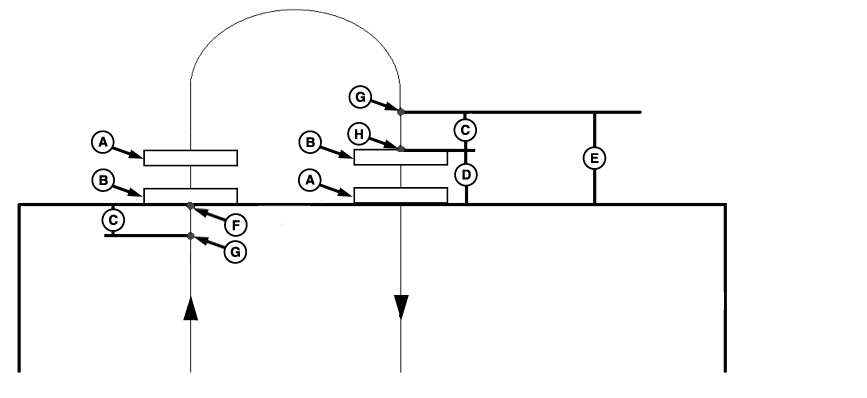
PC10857WV-UN-07JUN10
RANKED TURN ON—Two Ranked Tools Entering Then Leaving Headland
A - Rank 1
B - Rank 2
C - System Delay
D - Rank Delay
E - Ranked Turn On
F - Actual Off
G - Section Control Command
H - Actual On
System Delay = No Overlap (A) and No Overlap (B)
System Delay + Ranked Delay = No Overlap (A) and No Overlap (B)
|
HC94949,0000054-19-20120508 |