Constant Offset Boundary
NOTE: A boundary cannot intersect itself. Press Record/Pause button to pause recording just prior to stopping. Always start moving forward first before pressing the Record/Pause button to begin recording again.
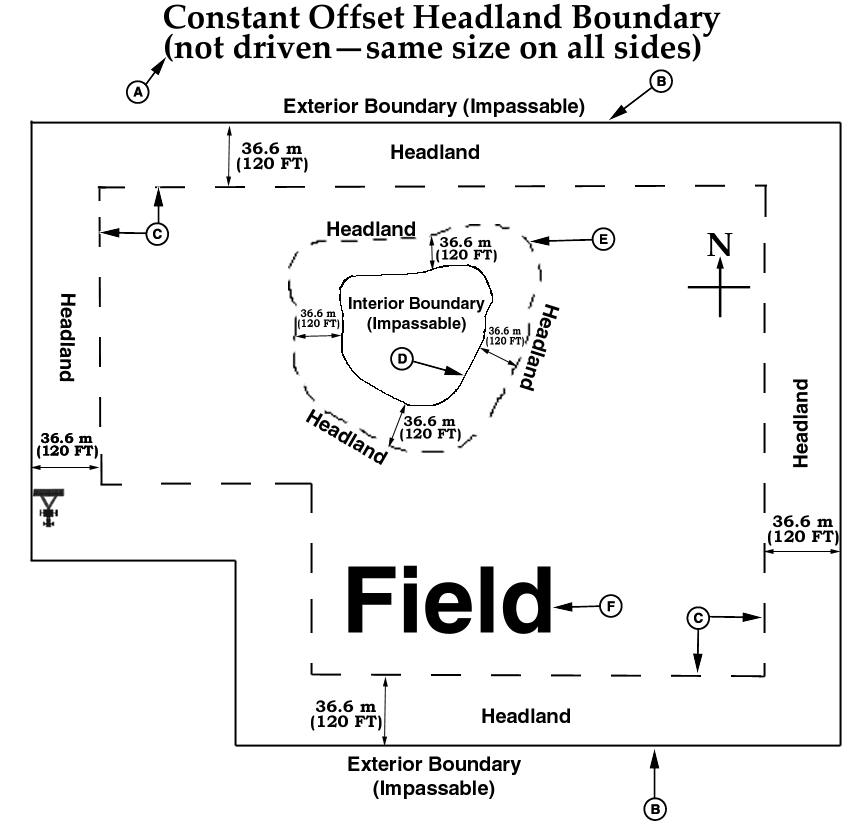
PC10500A-UN-21OCT08
Constant Offset (not driven—same size on all sides)
A - Constant Offset Headland Boundary (not driven—same size on all sides)
B - Exterior Boundary (Impassable)
C - Exterior Headland
D - Interior Boundary (Impassable)
E - Interior Headland
F - Field
Headland Constant Offset Boundary
-
An Exterior Boundary must exist for the field.
-
Choose Exterior Headland from the TYPE drop-down menu
-
Enter the name of the headland boundary in the HEADLAND GROUP drop-down menu. You can save several headland boundaries for a field for different implement widths.
-
In the Boundary Offset input box, indicate the distance from the headland to the exterior boundary (e.g. If the planter is a 16R30 and two passes are planted in the headland, enter 24.4 m (80 ft).
-
Repeat steps 2—4 for Impassable Interior Headlands. Also, an Interior Boundary must exist and Interior Headland must be chosen.
|
JS56696,000049A-19-20081006 |