Troubleshooting
-
Verify display and MTG are powered up.
-
Verify there are no cracks/breaks or visible damage to Ethernet cable.
-
Verify that there is an Ethernet cable connecting MTG to 2630 display and connections are tight.
-
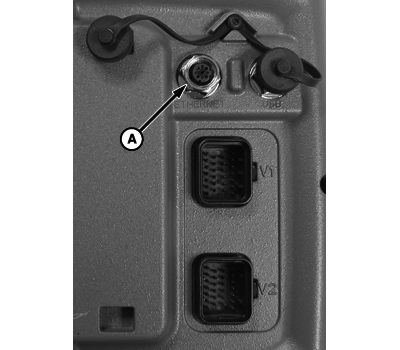
PC13664-UN-07DEC112630 Ethernet Connection
A - Ethernet Connection
Verify Ethernet cable is connected to correct port on back of 2630 display.There are two ports on back of 2630. One is labeled Ethernet and other is labeled USB. The Ethernet cable needs to be connected to Ethernet Port.
-
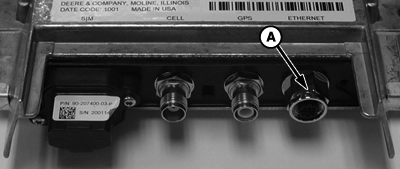
PC13665-UN-07DEC11MTG Ethernet Connection
A - Ethernet Connection
Ensure Ethernet cable is connected to correct port on MTG.There are 3 ports on the MTG. The port will be labeled Ethernet. The other two ports are for the antenna. They are labeled GPS and Cell.
-
Verify 2630 display is updated to latest software version.
NOTE: A list of the latest software versions and downloads for the latest updates can be found at StellarSupport.com.
-
Go to Main Menu > Message Center > Reprogram softkey.
-
Scroll to find Greenstar™ Display 2630 in the list.
-
Verify it has the latest software version.
-
If the display does not have the latest software version, download the latest version.
-
-
Verify software version of MTG.
NOTE: 2630 display and MTG must have compatible software versions for RDA to function.
-
Go to Main Menu > Message Center > Addresses softkey.
-
Select JDL from the drop down menu and check address 103 for MTG software version.
-
If the MTG does not have the latest software version, obtain latest software from your John Deere Dealer.
-
-
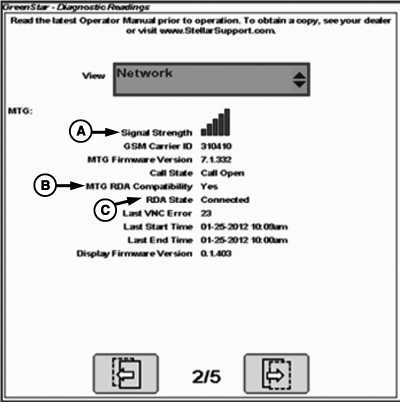
PC16162-UN-02NOV12A - Signal Strength
B - MTG RDA Compatibility
C - RDA State
Verify MTG is communicating and has cell signal.-
Check signal indicator icons on the display.
- Go to Main menu > GS3 > Diagnostics softkey. Select Network from the drop down menu and navigate to page 2.
-
Check MTG for Cellular Status.
-
Go to Main Menu > Message Center > Addresses softkey. Select
JDL from the drop down menu and check address 112.
Value Displayed
Description
0
No Error
1
Modem Unresponsive
2
No SIM
3
Network Registration Error
4
Error Establishing Calls
-
Go to Main Menu > Message Center > Addresses softkey. Select
JDL from the drop down menu and check address 112.
-
-
Cold boot display.
-
Power down machine.
-
Disconnect harness from display and leave unplugged for 15-20 seconds.
-
Plug harness back in to display.
-
Power up machine.
-
-
Cold boot MTG.
- Customers must contact your John Deere Dealer.
- Dealers refer to DTAC Solution 89996.
|
RW00482,000008E-19-20121102 |