Power Up
PC16120-UN-25OCT12
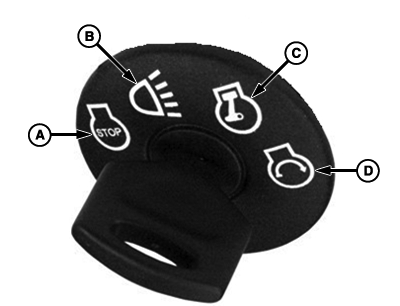
Ignition Switch
A - Stop
B - Accessories
C - Run
D - Start
During power up of display, a start-up screen will show a status bar that indicates display is powering up. Once the display has powered up, if no implement is connected, a default performance monitor screen will be shown. If an ISO implement is connected, that implement's information will be shown in application info area along with ten softkeys.
|
Display Power Up/Power Down |
||||
|
Current Key Switch Position |
Next Key Switch Position |
Engine Action |
Display and Tractor Controllers |
Description |
|
STOP |
ACCESSORIES |
No Start |
No Start |
Display and engine do not start, but can be used to run other machine accessories. |
|
STOP |
RUN |
No Start |
Start |
It is acceptable to start the display in this manner ONLY IF operator turns the key back to STOP position to turn off the display and let it fully power down and save settings before starting the engine. |
|
STOP |
START |
Start |
Start |
Proper way to start the display if operator plans on starting the engine. |
|
RUN |
START |
Start |
Potentially Have Issues |
Do not follow this scenario with machine and display or data loss can occur. If display is already powered up when the key is turned to the START position, it could create issues with display memory and connectivity with controllers. Starting the engine causes a drop in current, which can restart controllers in the wrong order as well as cause sudden data loss on the display. ALWAYS allow the display to shut down properly by turning the key to the STOP position before starting the engine. |
|
RUN |
STOP |
Turn Off, if Running |
Turn Off |
Proper way to turn off the engine and display OR for allowing the display to power down properly if the engine was not running and you plan to start it. |
|
START |
RUN |
Running |
Stay On |
The key switch only remains in START position as long as the operator is turning it. |
IMPORTANT: Do not remove 12 V power from display until the LED light is black. Prematurely removing power (green or orange light status) may cause loss of data and/or the display to lose functionality. It may take up to 20 seconds after removing key power for the LED light to completely go black.
IMPORTANT: The display must always be allowed to completely power down (LED light turns off) whenever the key is placed in the STOP position. Failure to do so can result in lost or corrupted data when power is restored.
When setting up the display with vehicle key in the accessory position (power on, engine off), turn key to STOP position for 20 seconds BEFORE starting the vehicle. This ensures the setup data is saved to the internal memory before operating.
If the vehicle is running during setup and programming, turn the vehicle off with key in the STOP position and wait 30 seconds before restarting. This ensures that all data is saved to the internal memory.
DO NOT turn the key to the start position directly from the accessory position. The reduction in voltage during the starting phase could result in a loss of all setup data.
IMPORTANT: If changes are made while machine is in auxiliary mode, turn key off and wait for display’s power light to turn off before starting the ignition. This allows display to shut down and save data.
|
RW00482,00000B8-19-20121126 |