Engage Active Implement Guidance
-
IMPORTANT: If steering device is not in contact with ground, Active Implement Guidance cannot effectively steer implement.
NOTE: For ease of instruction, this manual uses SCV 3 for the Active Implement Guidance system. Operator can choose to use SCV 1 if preferred.
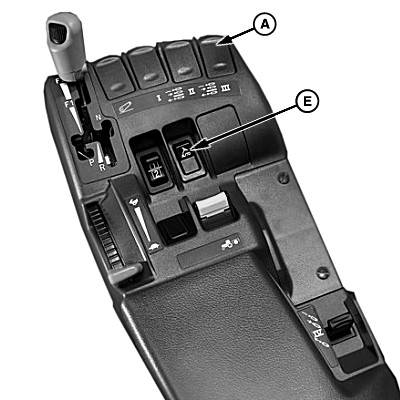
PC18002-UN-11DEC13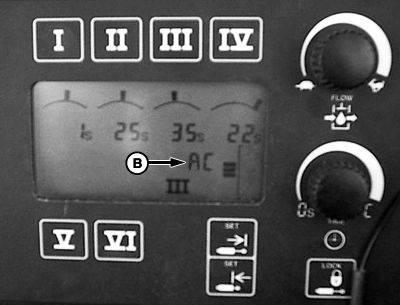
PC18234-UN-11DEC13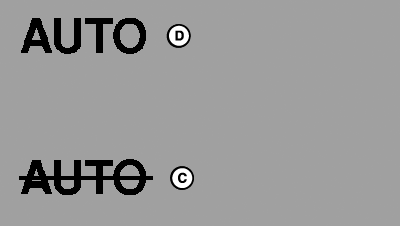
PC18004-UN-11DEC13A - SCV 3 Control Lever
B - SCV Right-Hand Console
C - Auto Not Operating
D - Auto Operating
E - AutoTrac™ Resume Switch
Set up guidance line on GreenStar™ display. -
NOTE: Leave SCV 3 in detent after each pass.
Using SCV controls, move SCV 3 control lever (A) to detent position to activate implement guidance.
-
NOTE: If operating a machine with CommandCenter™, ensure SCV has a check mark next to AUTO. See Adjusting Selective Control Valves—R Series Tractors for more information.
For more information on CommandCenter™ SCV controls, see machines Operator’s Manual.
Verify “EC” (manual SCV control) on right-hand console (B) changes to “AC” (auto SCV control).
If operating a machine with CommandCenter™, status indicator changes from Auto with a line through it (C) to Auto (D).
-
IMPORTANT: If AutoTrac™ Only is the requirement to engage, Active Implement Guidance begins acquiring line immediately after AutoTrac™ resume switch (E) is selected. For implements using a coulter steering system, movement starts even if implement is not in contact with ground.
Select resume switch to activate AutoTrac™ and Active Implement Guidance simultaneously. Machine and implement steer toward guidance line.
NOTE: Active Implement Guidance operates in reverse for 45 sec. After 45 sec., AutoTrac™ and Active Implement Guidance disengage.
NOTE:
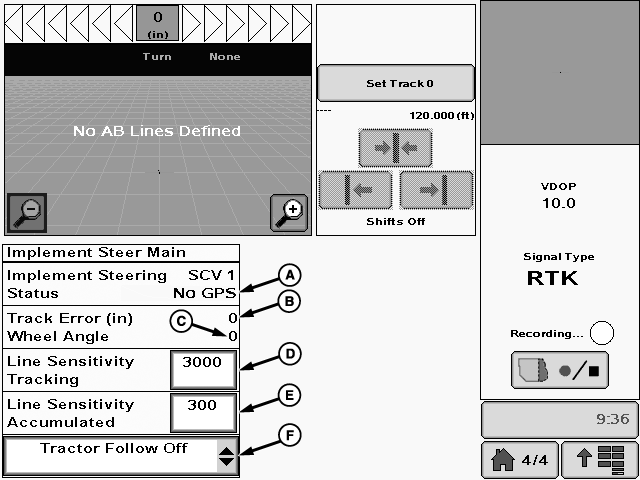
PC13066-UN-11NOV10
A - SCV Control Assignment and Status
B - Off-Track Error (Distance)
C - Wheel Angle (Implement)
D - Line Sensitivity Tracking
E - Line Sensitivity Accumulated
F - Tractor Follow On or Off Drop-down
Display page is for reference only. Actual pages appear differently due to connection of optional devices and software version in use.See GreenStar™ display Operator's Manual for information on page layout and display adjustments.
Active Implement Guidance Display Information:
-
SCV Control Assignment and Status (A): SCV control type is identified along with status of SCV. Status
alerts operator to current condition of control system.
- Cycle Power: Controller must be restarted.
- Not Activated: No activation is present within the controller, desired operation must be activated on controller.
- No GPS: No GPS correction available, ensure implement receiver is powered up and receiving signal.
- No GPS RTK: RTK correction not available.
- Update GPS SW: Receiver software requires update.
- Tractor SCV not Auto: SCV not in detent mode, detent applicable SCV lever.
- Implement Up: Implement raised or faulty implement height sensor, ensure requirement to engage is correct.
- Track Error (Distance) (B): Distance implement is off-track from current guidance line. A properly balanced implement has off-track errors + and - each side of 0.
- Wheel Angle (Implement) (C): Amount of corrective wheel movement to keep Track Error at 0. Wheel angle should be + and - on each side of 0. A wheel angle consistently on one side or other indicates system is steering one way to shift machine. If operating in straight track mode, this may indicate operation on a hillside. If on flat ground, it may indicate an incorrect center calibration or poor implement balance.
- Line Sensitivity Tracking (D): Affects line acquisition only. Determines how aggressively Active Implement Guidance responds to tracking errors while machine is acquiring track. Tracking error is distance between implement location and desired track. Higher values cause Active Implement Guidance to respond more aggressively to move implement location to desired track. See In-Field Adjustments and Tuning for more information. Value range: 10—10000. Default setting: 3000.
- Line Sensitivity Accumulated (E): Affects on-line performance only. Determines how fast or aggressively system commands wheels to react to off-line errors while on hills and slopes. Value range: 10—10000. Default setting: 300. See In-Field Adjustments and Tuning section for more information.
-
NOTE: For more information see Follow Mode section.
Tractor Follow On or Off (F): Allows operator to turn Follow Mode On or Off.
|
BA31779,00006B3-19-20131218 |