Adjust Sensitivity Settings
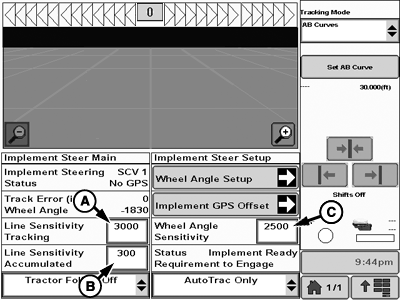
PC18005-UN-07NOV13
Home Page
A - Line Sensitivity Tracking Input
B - Line Sensitivity Accumulated Input
C - Wheel Angle Sensitivity
With AutoTrac™ and Active Implement Guidance engaged, sensitivity settings can be adjusted for optimum performance.NOTE: At start, set line sensitivity tracking about ten times the value of line sensitivity accumulated. After, adjust each value individually to fine-tune performance.
Adjusting Sensitivity Settings:
-
Line Sensitivity Tracking (A): Affects line acquisition performance only. Determines how fast or aggressively implement steers towards guidance line.
Range is 10—10000 with typical setting between 1500—5000. Increasing value increases aggressiveness of steering.
-
Line Sensitivity Accumulated (B): Affects on-line performance only. Determines how quickly system reacts to errors while off-line, on hills, and slopes.
Range is 10—10000 with typical setting between 150—500. Increasing setting increases reaction speed during off-track conditions.
-
Wheel Angle Sensitivity (C): Determines how aggressively system responds to errors in commanded steering angle.
Higher values cause system to respond more aggressively to errors. Wheel angle sensitivity values range between 10—9999. Typical settings for wheel angle sensitivity:
- Small Cylinder = 500
- Large Cylinder = 5000
|
BA31779,00006B4-19-20131217 |