Requirement to Engage

PC14926-UN-27APR12
Application Controller 1100 Button

PC12961-UN-29AUG11

PC17995-UN-07NOV13
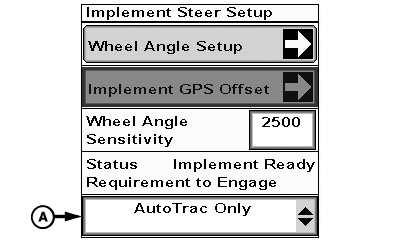
Implement Steer Setup Button
PC17996-UN-07NOV13
Implement Steer Setup
PC17997-UN-07NOV13
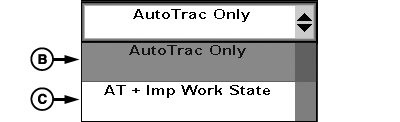
Requirement to Engage Drop-down
A - Requirement to Engage Drop-down
B - AutoTrac™ Only
C - AT + Imp Work State
To select how Active Implement Guidance engages:
-
Select Application Controller 1100 button.
-
Select Setup softkey.
-
Select Implement Steer Setup button.
-
Select Requirement to Engage drop-down (A) to change setting.
-
Select AutoTrac™ Only (B) to engage Active Implement Guidance whenever AutoTrac™ is enabled.
NOTE: See Display Operator’s Manual for more information on setting up recording source.
Select AT + Imp Work State (C) to engage Active Implement Guidance whenever AutoTrac™ is enabled and recording source is enabled.
|
BA31779,00006B8-19-20131209 |