Adjust Selective Control Valves—R Series Tractors
RXA0117610-UN-10JUN11
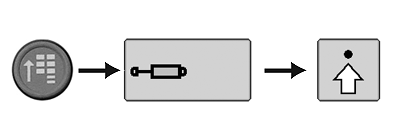
CommandARM™ Menu Button > SCV Softkey > Advanced Settings Softkey
PC18231-UN-11DEC13
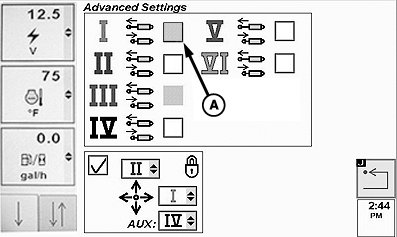
SCV Advanced Settings Page
PC18232-UN-11DEC13
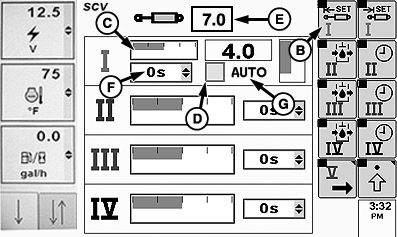
SCV Homepage
PC18233-UN-11DEC13
A - Independent Mode Checkbox
B - Extend Set Softkey
C - Detent Flow Bar Graph
D - Auto Mode Checkbox
E - Detent Flow Value Box
F - Detent Time Drop Down-down Menu
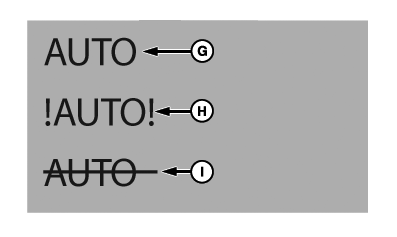
G - Auto Mode Indicator (Normal Operation)
H - Auto Mode Indicator (Fault Identified)
I - Auto Mode Indicator (Turned Off)
NOTE: To use Auto mode, connect Application Controller 1100 to machine. See Application Controller 1100 Install Instructions for more Information.
-
Connect implement to machine.
-
Select CommandARM™ Menu button.
-
Select SCV softkey.
-
Select Advanced Settings softkey.
-
Select Extend Set softkey (B) to navigate to detent flow bar graph (C). Select Confirm button to highlight. Rotate thumb wheel to adjust flow, then select Confirm button.
-
Auto checkbox (D) must be checked for Active Implement Guidance to control hydraulics, uncheck box to disengage Active Implement Guidance.
Bar graph displays detent flow. Amount of detent flow is shown in box (E).
Detent time drop-down (F) can only be adjusted when Auto mode checkbox is unchecked. Use standard mode when adjusting detent time.
AUTO (G) indicates normal Auto mode operation. !AUTO! (H) indicates a fault and Auto mode is inoperable. AUTO with a strike through it (I) indicates Auto mode is not active.
|
CommandARM is a trademark of Deere & Company |
BA31779,00006BB-19-20131218 |