Adjust Selective Control Valve—30 Series Tractors and Older
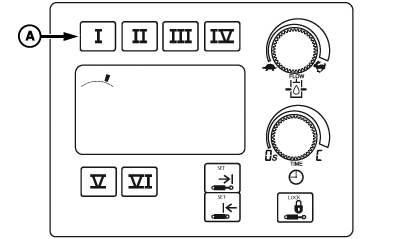
PC17987-UN-07NOV13
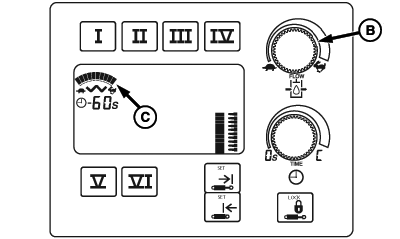
PC17988-UN-07NOV13
A - SCV Selection Buttons
B - Flow Adjustment Dial
C - Bar Graph Display
 CAUTION: Excessive operating speed can cause damage or injury.
Full extension or retraction of cylinder must take at least 2 sec.
CAUTION: Excessive operating speed can cause damage or injury.
Full extension or retraction of cylinder must take at least 2 sec.
Adjust rate of operation for each job.
Change flow setting as follows:
-
Select SCV selection button (A) for SCV being used. Display under SCV selection buttons displays previous rate of flow.
NOTE: To provide operator with additional indication of command setting, as operator turns flow adjustment dial (B) through flow settings, display increases or decreases number of line increments as flow changes.
-
Turn flow adjustment dial clockwise to increase flow or counterclockwise to decrease flow. Flow setting is shown on bar graph display (C) when adjustments are made.
NOTE: SCV can be operated to observe flow rate while in adjustment mode. If total flow demand exceeds available pump flow, reduced cylinder cycle times or a reduction in motor speed results.
|
SCV FLOW OUTPUT (APPROXIMATE) |
||
|---|---|---|
|
Flow |
||
|
SCV Flow Settings |
L/min. |
gpm |
|
0.1 1 |
— |
— |
|
1.0 |
3.6 |
1.0 |
|
2.0 |
7.2 |
1.9 |
|
3.0 |
10.2 |
2.7 |
|
4.0 |
14.4 |
3.8 |
|
5.0 |
19.2 |
5.0 |
|
6.0 |
24.0 |
6.4 |
|
7.0 |
31.2 |
8.2 |
|
8.0 |
39.6 |
10.5 |
|
9.0 |
65.4 |
17.2 |
|
10.0 |
114 |
30.0 |
|
1 0.1 = Minimum Flow Setting
|
BA31779,00006BC-19-20131217 |