Implement Shifter
Implement shifter mode allows operator to utilize an implement that has an active steering mechanism without the need of a position feedback sensor. Implement shifter utilizes only GPS data and does not incorporate additional accuracy of a feedback sensor into steering system.

PC14926-UN-27APR12
Application Controller 1100 Button

PC13072-UN-16NOV10
Application Controller Main Softkey

PC17980-UN-07NOV13
Implement Shifter Setup Button

PC17981-UN-07NOV13
Implement GPS Offset Button

PC17983-UN-07NOV13
Position Shifted Drop-down

PC17984-UN-07NOV13
Left/Right Shift Input

PC17974-UN-07NOV13
Back Button

PC17982-UN-07NOV13
Requirement To Engage Drop-down
Implement Shifter Calibration-
Application Controller 1100 button.
-
Select Application Controller Main softkey.
-
Select Implement Shifter Setup button.
-
Select Implement GPS Offset button.
-
Select Position Shifted from drop-down and enter Left/Right Shift value.
-
Select Back button.
-
Select desired Requirement to Engage from drop-down.
PC17985-UN-07NOV13
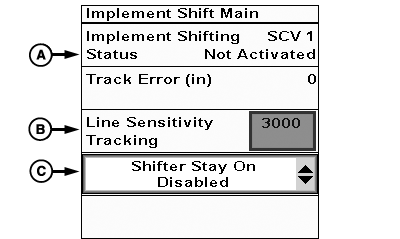
Implement Shift Main

PC17986-UN-07NOV13
Shifter Stay On Drop-down
A - Implement Shifting Status
B - Line Sensitivity Tracking
C - Shifter Stay On Drop-down
Implement Shifter Operation-
On Implement Shift Main page, ensure Status (A) is Ok.
-
Adjust Line Sensitivity Tracking (B) as necessary.
-
Select desired Shifter Stay On mode from drop-down (C).
When enabled, Shifter Stay On keeps system from disabling when AutoTrac changes state. Shifter Stay On is similar to Follow Mode of Implement Steer setup.
|
BA31779,00006C9-19-20131119 |