SCV Threshold Calibration
 CAUTION: To avoid serious injury, keep area around equipment
clear. Procedure requires machine to move forward.
CAUTION: To avoid serious injury, keep area around equipment
clear. Procedure requires machine to move forward.
Implement moves during calibration. Read and follow Operate Implement Automation Systems Safely in Safety section before performing calibration.
NOTE: SCV threshold calibration is not performed with external valve connected. To adjust hydraulic flow to external valve refer to External Valve Hydraulic Flow Adjustment section.
Each time Active Implement Guidance is installed on a different machine, perform an SCV threshold calibration. Without SCV threshold calibration, steering mechanism steers faster in one direction, under steers, over steers, or does not perform as expected due to hydraulic limitations. These factors make it difficult for controller to maintain an off-track error of 0.
NOTE: To calibrate SCV threshold, machine must slowly move forward greater than 0.5 km/h (0.3 mph) with selected SCV (SCV 1 or 3) detented to “AC” or “AUTO”, as displayed by SCV indicators. Implement does not need to be in lowered (working) position for calibration.
If machine is not moving faster than 0.5 km/h (0.3 mph), SCV control does not produce hydraulic flow.
Calibrate SCV Thresholds
-

PC14926-UN-27APR12Application Controller 1100 Button

PC12961-UN-29AUG11Setup Softkey

PC17989-UN-07NOV13SCV Threshold Setup Button
Select Application Controller 1100 button. -
Select Setup softkey.
-
Select SCV Threshold Setup button.
-
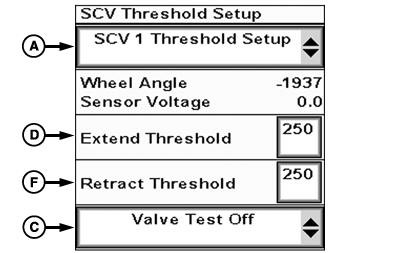
PC17990-UN-13NOV13SCV Threshold Setup
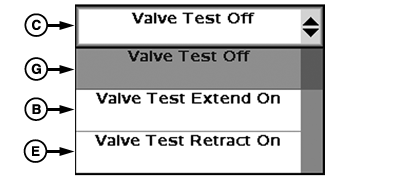
PC17994-UN-13NOV13Valve Test Drop-down
A - SCV Threshold Setup Drop-down Menu
B - Valve Test Extend On
C - Valve Test Drop-down Menu
D - Extend Threshold
E - Valve Test Retract On
F - Retract Threshold
G - Valve Test Off
Select SCV being used from SCV Threshold Setup drop-down (A). -
Select Valve Test Extend On (B) from drop-down (C).
-
Adjust Extend Threshold value (D) to lowest setting that produces a steady, consistent motion.
- If sensor voltage does not change, increase Extend Threshold value.
- If sensor voltage moves quickly or erratically, decrease Extend Threshold value.
- If present, wheel angle sensor voltage must be increasing in value, if not swap hydraulic lines.
- Repeat procedure as required to obtain a slow, smooth, and constant change in sensor voltage.
-
This test is performed to tell system the minimum amount of
signal to send to hydraulics controller before movement begins for
corrections. High settings produce erratic performance. Low settings
produce slow performance.
NOTE: Some implements require sensor to be fully retracted to
increase range of extend motion.
-
Select Valve Test Retract On (E) from drop-down.
-
Adjust Retract Threshold value (F) to lowest setting that produces a steady, consistent motion.
- If sensor voltage does not change, increase Retract Threshold value.
- If sensor voltage moves quickly or erratically, decrease Retract Threshold value.
- Repeat procedure as required to obtain a slow, smooth, and constant change in sensor voltage.
- This test is performed to tell system the minimum amount of signal to send to hydraulics controller before movement begins for corrections. High settings produce erratic performance. Low settings produce slow performance.
-
Select Valve Test Off (G) when calibration is complete.
Once constant movement is detected at wheel angle, threshold is set properly. Wheel cycles left to right in an equal and constant manner when threshold is properly set.
Increase or decrease hydraulic flow on right-hand console or on CommandCenter™ to produce adequate hydraulic flow to implement steering system. Repeat SCV threshold setup after hydraulic flow is adjusted. Adjusting threshold down is only necessary on small cylinders or low flow mechanisms.
NOTE: Anytime an adjustment to system is made, such as SCV hydraulic flow rate or counterbalance valve adjustment, calibrate SCV threshold.
After calibration is complete, verify proper performance before using Active Implement Guidance in field operation.
|
BA31779,00006D8-19-20131216 |