Setup Wizard

PC10857JH-UN-13APR09
Setup Wizard Button
PC13199-UN-25MAR11
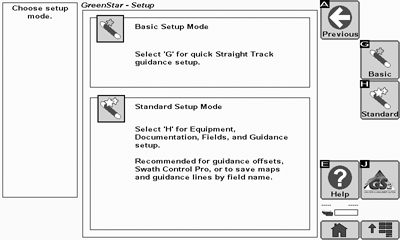
Setup Wizard Screen
The Setup Wizard walks you through setup of your GreenStar system.There are two Setup Modes contained in the Setup Wizard:
- Basic Mode is a quick setup for straight track guidance and sets all other setup data to defaults.
- Standard Mode takes the user through all setup necessary for using field names, curve track guidance, Swath Control Pro, and documentation.
Basic Mode is NOT RECOMMENDED for use with curve track guidance or Swath Control Pro due to mapping inaccuracies that may occur without proper equipment offsets setup.
The Setup Wizard does not allow you to advance without filling out required entries so it is important to enter correct information in all entry boxes.
Proper setup is important whether you are running AutoTrac, Swath Control, or just Coverage mapping. Machine and implement dimensions impact the accuracy of the maps recorded and how well the machine follows a guidance track. Naming fields allows storage of coverage maps and guidance lines by field.
You can use GreenStar Apex desktop software to assist in setting up your management data. Setup information such as Client, Farm, Field, and Implement names can be created in Apex and transferred to your display. Machine and Implement dimensions may be downloaded from a database provided by John Deere using Apex.
If changes are made while machine key switch is in auxiliary mode, turn the key off and wait for display to completely shut down before starting the ignition. This allows display to shut down and save the setup data to permanent memory. Changes to entries in the Setup Wizard are saved to temporary memory when the Next, Previous, or GreenStar Main softkeys are pressed.
Machine and Implement dimensions that are downloaded from the John Deere database may need to be modified for the unique variances of your equipment.
A GPS receiver is required to run GreenStar applications.
Up to 250 names may be entered for most setup items, such as Clients, Farms, Fields, and Guidance lines.
|
BA31779,000017D-19-20110503 |