Creating a Boundary
Internal and External Boundaries are created with similar steps. The following steps outline the process for creating a boundary while driving a vehicle. Boundaries may be created during an operation (e.g. planting), but some functions are not available.
An Internal boundary can NOT be created without first creating an External boundary for the field.
-

PC10857JK-UN-13APR09Field Quick Change
Select Field Quick Change from the GreenStar Main page. -
Select or create the Client, Farm, and Field for which you would like to create the boundary.
-

PC10857MC-UN-14APR09Boundaries Softkey.
Select the Boundaries Softkey -
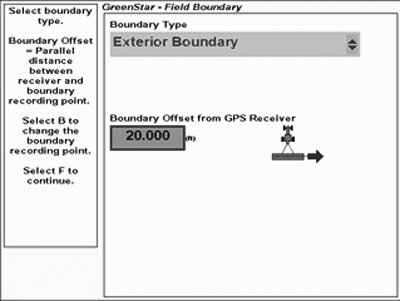
PC13559-UN-03MAY11GreenStar Field Boundary
Choose TYPE of boundary you would like to create. If you choose Interior, you must give the boundary a name. Both Exterior and Interior boundaries are associated with the field name. -
Enter the Boundary Offset Distance. The distance from the center of the vehicle GPS receiver to the boundary line that will be created.
-

PC10857ME-UN-14APR09Boundary Offset Toggle Softkey
Select the Boundary Offset Toggle Softkey to choose the Boundary Recording Point location:- Left or right of the vehicle GPS receiver
- Left or right of the rear of a rear mounted implement or the front of a front mounted implement. This position is determined by implement offsets 1 and 2.
-

PC10857JP-UN-13APR09Next Button
Select Next button. -
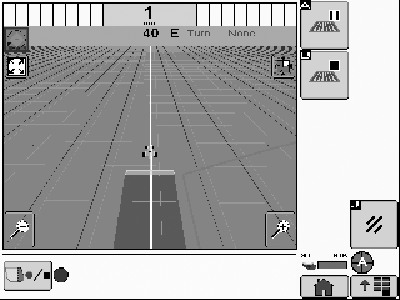
PC13560-UN-03MAY11Run Page

PC10857MF-UN-14APR09Start Boundary Recording
Move the vehicle for at least 1 second and then select Start Boundary Recording .-

PC10857MH-UN-14APR09Pause Boundary Recording
Pause Boundary Recording is typically used to drive around an obstacle or back the implement into a field corner for a more accurate boundary. The boundary will show a straight line from where recording was paused to where it was resumed. -

PC10857MI-UN-14APR09Stop Boundary Recording
Stop Boundary Recording will stop and save the boundary. -

PC10857XQ-UN-16JUN10Cancel Boundary Recording
Cancel Boundary Recording will cancel the boundary.
-
-
Stop recording just prior to the point where recording was started to complete the boundary. A straight line will be drawn between the stop point and start point.
|
BA31779,0000190-19-20110503 |