Curve Track Settings
PC10857NL-UN-27APR09
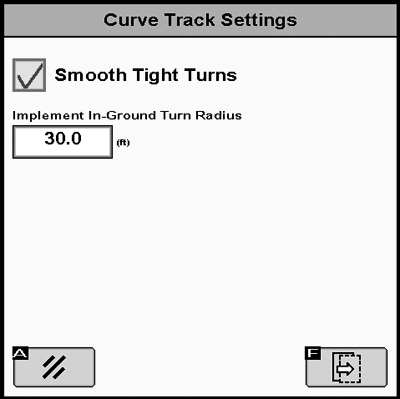
Smooth Tight Turns - When box is checked the system will automatically smooth a propagated path that was becoming tight.
PC9529-UN-27OCT06
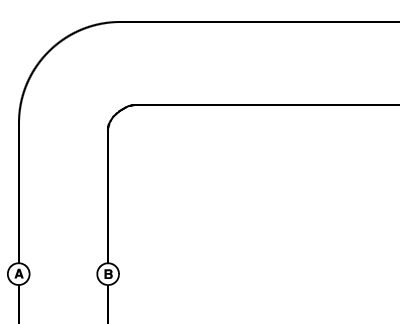
Smoothing Tight Turns OFF
A - Previous Pass
B - Next Pass—Smoothing Tight Turns Off
PC9530-UN-27OCT06
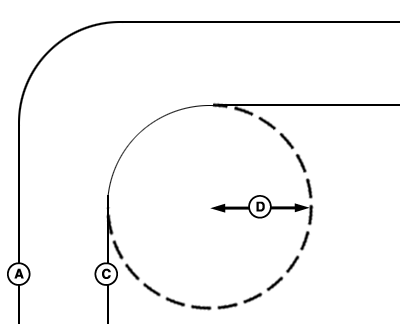
Smoothing Tight Turns ON
A - Previous Pass
B - Next Pass—Smoothing Tight Turns On
PC9905-UN-05FEB07
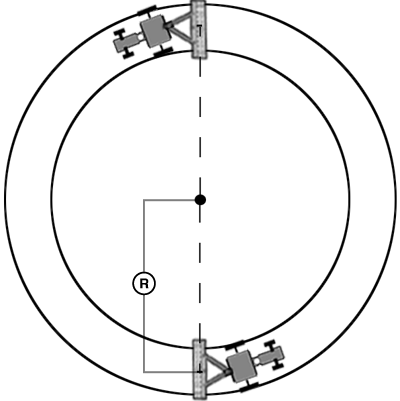
Radius
Implement In-Ground Turn Radius - This value is the smallest turn radius the implement can turn while in the ground.
R—Implement Turn Radius
Recording Source – Adaptive Curve Track recording may be triggered manually or based on AutoTrac or Coverage.
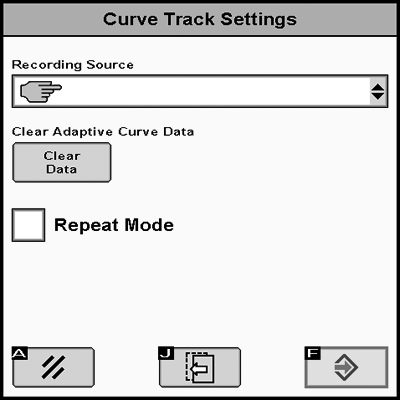
PC10857NM-UN-27APR09
For this field only—clears Curve Track data for current field only in memory
For all fields—clears Curve Track data for all fields stored in memory
Repeat Mode – Repeat Mode allows the guidance track to be displayed when Recording is OFF. Turn ON Repeat Mode to guide on a previously recorded Adaptive Curve Track. Repeat Mode is OFF by default.
The Adaptive Curve Recording softkey is disabled when Repeat Mode is ON.
|
CZ76372,00001D8-19-20101012 |