Basic Setup Mode
The Basic Setup Wizard only walks through the bare necessities needed to run straight track guidance. All other setup is set to default values. Any guidance lines or coverage maps will be saved as Global guidance lines and maps. Global guidance lines and maps are only available when NO field name is selected. When using this mode the user will need to clear the coverage map more often.
If any settings were previously set using the Standard Setup Mode, those settings will be reset to defaults upon entering Basic Setup Mode. Those settings may be re-selected again using the Standard Mode or the quick change buttons on the Main Page.
-
Select the Basic Wizard button.
PC13195-UN-24MAR11 -
Enter the desired Track Spacing to define the desired overlap or skip between passes.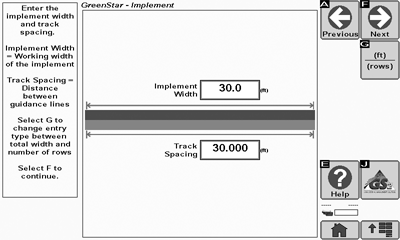
PC13196-UN-24MAR11 -

PC10857JP-UN-13APR09Next
Select Next button. -
Select a Recording Source to turn Coverage recording ON and OFF.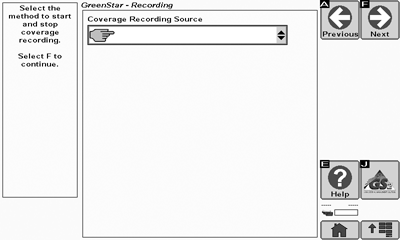
PC13197-UN-24MAR11 -
PC10857JP-UN-13APR09Next
Select Next button. -
Set the tracking mode to Straight Track and enter a track name. Once the name is created, set the tracking line. For more information on setting up guidance lines, see the Guidance Track Setup section. When the guidance line is set, the display is ready to go.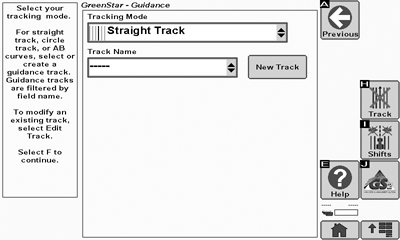
PC13198-UN-24MAR11
|
CZ76372,00002A8-19-20110503 |