Documentation Basics
GreenStar Documentation will only be available if John Deere Documentation Basics is activated on the display. See Managing Activations section earlier in this manual.
Documentation with the GS2 1800 display can only record a single operation at a time. Multiple GreenStar Rate Controllers, multiple tanks on an air cart, or planters with fertilizer application cannot be recorded.
Even though an Air Cart will not record because of multiple tanks, the operator can manually create an operation to record.
Manage List
Drop down lists on the Documentation screen that allow the user to create <New> entries also have the option to <Manage List>. Whenever this item is selected, a Data Cleanup screen can be used to remove items from the drop down list.
PC13210-UN-28MAR11
Documentation Setup
-
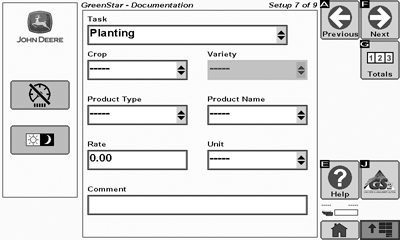
Select the Task for the operation being recorded.
Task is not related to any implement type. The Task name is a free name that can be entered by the operator to define the job. The predefined names are only common job names.
-
Select either the Crop or Product Type. Once a selection is made in one of the drop downs, the other will become greyed out. Depending on your selection, choose the Variety or Product Name.
On the previous implement setup screen, if a seeding implement is selected for Implement Type, Crop will only be visible. Conversely, if a product application implement is selected, Product Type will only be visible.
-
Enter the Rate and Units for the operation.
If connected to an ISOBUS Implement, some selections may be greyed out. Refer to the Implement interface to make any changes.
-
Lastly, enter any comments or notes for the operation.
See section John Deere Documentation Basics for information on generating documentation reports.
-

PC10857JP-UN-13APR09Next Button
Select Next button.
|
CZ76372,00002AD-19-20110418 |