Field
PC13555-UN-03MAY11
Client, Farm, and Field Name
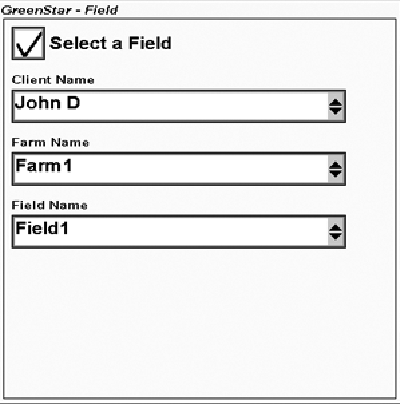
Select the check box for “Select a Field”. This allows the user to enter Client, Farm, and Field Names.
Manage List
The drop down lists on the Field screen have the option to <Manage List>. Whenever this item is selected, a Data Cleanup screen can be used to remove items from the drop down list.
Field Setup
-
Select or create Client Name. Farms and Fields are organized by Client. Clients are important for service providers, but for many operators the Client will always be the same.
-
Select or create the Farm Name.
-
Select or create the Field name. Coverage maps and guidance tracks are organized by Field.
You may create “Global” coverage maps and guidance tracks by choosing not to select a field. Only one global coverage map may be stored at a time. Be aware that global guidance tracks can not be selected if a Field is selected.
-

PC10857JP-UN-13APR09Next Button
Select the Next button.
|
CZ76372,00002AE-19-20110503 |