GreenStar Main Page
PC10857WZ-UN-15JUN10
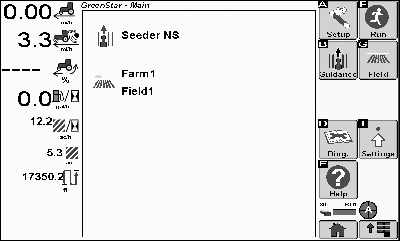
GreenStar Main Page
The GreenStar Main Page is the center for access to GreenStar functions and lists the currently selected Client, Farm, Field, and Guidance Track.
Some buttons and softkeys only appear when the hardware or functions associated with those buttons are connected or available, respectively.

PC10857JH-UN-13APR09
Setup Wizard
Setup Wizard – Must complete prior to operation. Complete each step for optimal system performance.

PC10857JI-UN-13APR09
Run
Run - Return to Run Page if your system is already setup.

PC10857JJ-UN-13APR09
Guidance Quick Change
Guidance Quick Change - Change Tracking Mode or Edit Track

PC10857JK-UN-13APR09
Field Quick Change
Field Quick Change - Change Field or Create a boundary

PC13230-UN-31MAR11
Spacing Quick Change
Spacing Quick Change - Change Implement Width and Tracking Spacing

PC13231-UN-31MAR11
Documentation Quick Change
Documentation Quick Change - Change Task and Operation settings

PC10857JL-UN-13APR09
GreenStar Diagnostics
GreenStar Diagnostics

PC10857JF-UN-13APR09
Settings Button
GreenStar Settings

PC10857JM-UN-13APR09
Help
Help - Show help text in the Left Region

PC10857JN-UN-13APR09
GreenStar Button
You can return to GreenStar Main from most pages in the GreenStar application by selecting the GreenStar button.|
CZ76372,00002BF-19-20110331 |