Configuring Tractor For DIRECT GPS or Ground Based Radar Feed (CAN-Based Vehicles ONLY)
PC9120-UN-17APR06
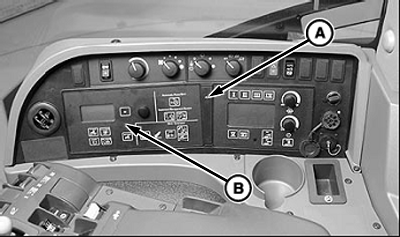
Remove Command Center Panel
PC9121-UN-17APR06
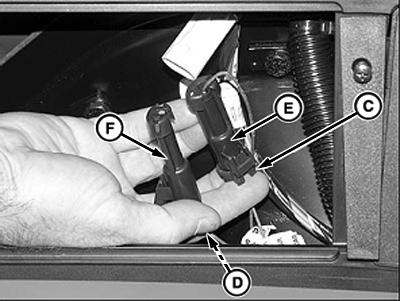
Connect GPS side of Harness
A - Screw
B - Command Center
C - Radar Plug
D - GPS Plug
E - Connector
F - Dust Cap
If you have any questions, your John Deere dealer can assist in field installing GPS or a radar device. CAN-Based tractors equipped with radar must be re-configured when switching to GPS receiver as the true ground speed input signal or vice versa for calibrating the ground based radar.
Certain CAN-Based vehicles will need CCU and TECU vehicle address configuration changes to enable radar operation. Please see your John Deere Dealer for service support.
-
Remove screw (A) and Command Center (B).
-
Inside right-hand console locate console one wire lead marked ”GPS” and one marked ”Radar”.
-
Remove radar plug (C) from wiring connector (E).
-
Remove GPS plug (D) from dust cap (F).
-
Install GPS plug into connector and radar plug into dust cap.
-
Install Command Center with previously removed screw.
|
OUO6050,0000CDB-19-20071108 |