Front of Display
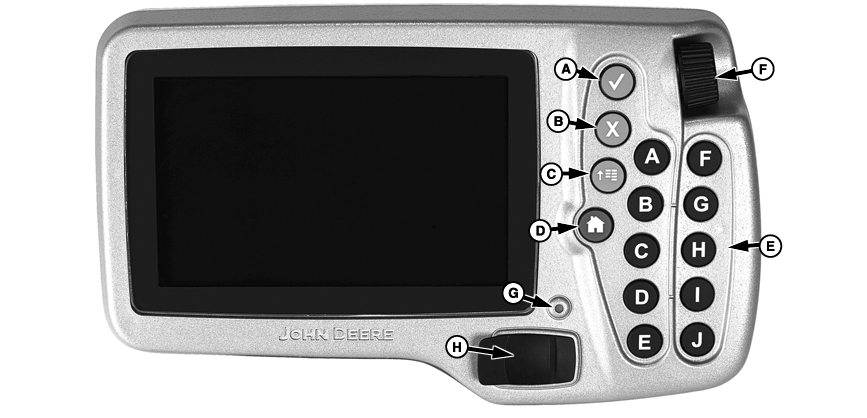
PC10857DT-UN-29SEP08
A - Check
B - Cancel
C - Menu
D - Home
E - A-J buttons
F - Thumb Wheel
G - LED
H - USB port
(A) Check button - select input fields, buttons, or softkeys.
(B) Cancel button - used to cancel out of a selection.
(C) Menu button - shows list of available applications and controllers (Virtual Implements).
(D) Home button - toggles between three operator-defined home screens.
(E) (A) through (J) keys - shortcut buttons that allow operator one-touch selection of desired input field, button, or softkey with the corresponding letter.
(F) Thumb Wheel - move the highlighted area around screen to access desired application.
(G) Status LED - green when display is on, orange when display is starting up and shutting down.
If LED is FLASHING ORANGE and the screen is blank, an out of range temperature condition is detected and the unit should be turned off to prevent damage to the display.
Operating Temperature Range
-20° to 70° C (-4° to 158° F)
Storage Temperature Range
-40° to 85° C (-40° to 185° F)
(H) USB port - used to transfer data to and from display and also updating software. Most USB drives will work with the display.
|
OUO6050,0000F96-19-20080929 |