Operating With More Than One Virtual Terminal Display
PC10857GL-UN-29OCT08
Display

PC10857GJ-UN-28OCT08
Menu button
PC8654-UN-05AUG05
Display button

PC8792-UN-18OCT05
Settings button

PC10857GK-UN-29OCT08
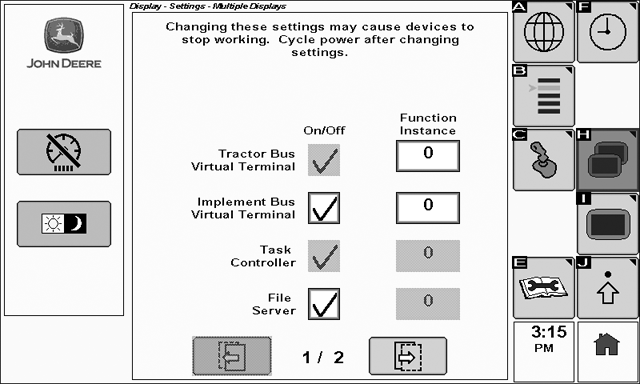
To modify settings for multiple display operation select: Menu > Display > Settings > Multiple Displays
In some cases, it may be desirable to operate the GS2 1800 in tandem with another virtual terminal display (such as an 8R tractor CommandCenter). This type of scenario requires that the display be configured to recognize and operate in conjunction with the second display.
PC10857GM-UN-29OCT08
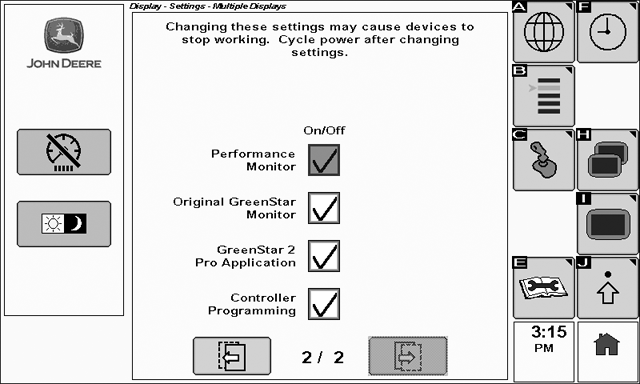
The following table gives guidelines for disabling the various display features
|
Tractor Bus Virtual |
Terminal Tractor Bus Virtual Terminal cannot be disabled. No adjustment required. |
|
Implement Bus Virtual Terminal |
Disable the Implement Bus Virtual Terminal in order to force external controllers to use an alternate display. For example, disable this feature on the GS2 1800 in order to make devices such as StarFire and GS2 Rate Controller operate on the 8R CommandCenter. |
|
Task Controller |
Task Controller is enabled / disabled automatically based on vehicle type. No adjustment required. |
|
File Server |
Disable this feature if the Implement Bus Virtual Terminal is disabled. |
|
Performance Monitor |
Performance Monitor cannot operate simultaneously on two displays. Disable this feature to view Performance Monitor data on an alternate display. |
|
Original GreenStar Monitor |
Original GreenStar Monitor cannot operate simultaneously on two displays. Disable this feature to view Original GreenStar Monitor on an alternate display. Original GreenStar Monitor must be checked to run AutoTrac on 20 series (CCD bus) tractors. |
|
GreenStar 2 Pro Application |
GreenStar 2 Pro Applications cannot operate simultaneously on two displays. Disable this feature to operate GreenStar 2 Apps on an alternate display. |
|
Controller Programming |
Controller Programming can only be conducted via one display. Disable this feature to program external controllers via an alternate display. |
The Virtual Terminal function instance settings can be modified for the Virtual Terminal on each CAN bus. Some external controllers take function instance into account when determining which display to interact with. As a general rule, setting function instance to a number other than zero will indicate it is a lower priority display.
|
OUO6050,000100E-19-20100602 |