Choosing Home Pages For Your Display
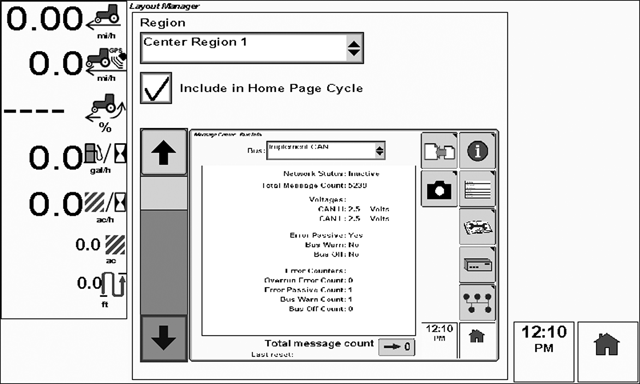
PC10857HI-UN-30OCT08

PC10857GJ-UN-28OCT08
Menu button
To view the Layout Manager page select: Menu > Layout Manager
The Layout Manager will appear the first time you power up your display. Layout Manager allows you to choose what information will be displayed for home pages, and what information will be displayed in the left region of the screen.
-
Rotate the thumb wheel until the Region list box is highlighted.
-
Select the check button to expand the list.
-
Choose the region you would like to setup (such as Center Region) and select the check button.
-
Rotate the thumb wheel until the page image in the center of the screen is highlighted and select the check button.
-
Rotate the thumb wheel to scroll through the available pages.
-
Select the check button to select the desired page.
-
Check box to include page in Home Page cycle
-
After choosing the home pages, select the Home button repeatedly to change the active home page.
|
OUO6050,0001014-19-20081030 |