Adjusting Volume And Brightness
PC10857HA-UN-30OCT08
Display

PC10857GJ-UN-28OCT08
Menu button

PC8654-UN-05AUG05
Display button

PC10857HG-UN-30OCT08
Display
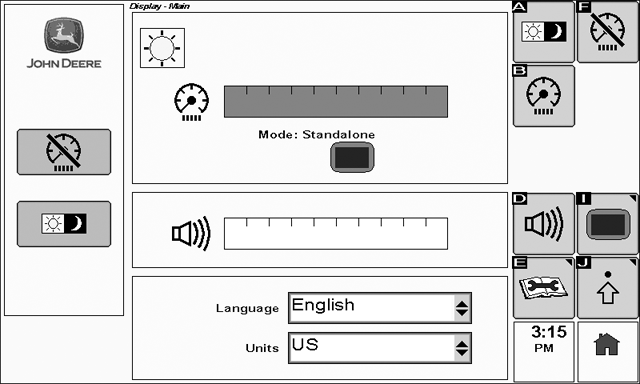
To view the Display - Main page select: Menu > Display > Display
The speaker volume and screen brightness can both be adjusted.
To adjust the volume:
-
Select the volume slider bar by rotating the thumb wheel until the volume slider bar is highlighted and then select the check button.
-
Rotate the thumb wheel to make the volume adjustment.
-
Select the check button to save the adjustment.
To adjust screen brightness:
-
Select the brightness slider bar by rotating the thumb wheel until the brightness slider bar is highlighted and then select the check button.
-
Rotate the thumb wheel make the desired adjustment.
-
Select the check button to save the adjustment.
The display brightness can also quickly be toggled between day and night mode by selecting this button.
Note that the brightness level for each mode is set independently.
To put the display into dim mode select the dim button. Once in dim mode, selecting any button on the display will re-activate the backlight
Settings button - Navigate to display settings page.
If the GS2 1800 is installed in a late model John Deere vehicle, an option called "Sync with Cab" is available. In this mode the display will sync it's brightness level with other devices in the cab. Select the Settings button next to the brightness mode indicator to make adjustments to the "Sync with Cab" mode. Point this out in a screen shot
|
OUO6050,0001018-19-20081030 |