Changing Regional Settings
PC10857HH-UN-30OCT08

PC10857GJ-UN-28OCT08
Menu button
PC8654-UN-05AUG05
Display button

PC8792-UN-18OCT05
Settings button

PC10857HD-UN-30OCT08
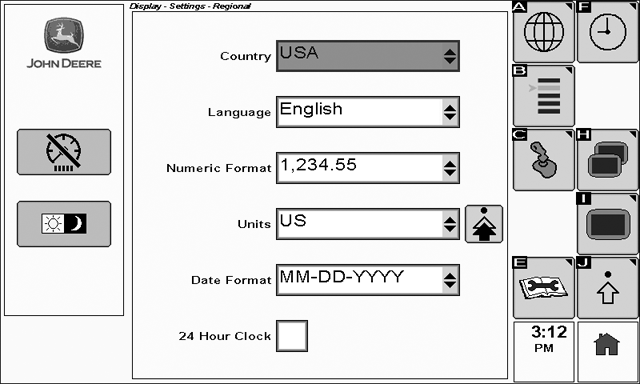
Regional Settings
To view the Regional Settings page select: Menu > Display > Settings > Regional Settings
Regional Settings are available to support intuitive operation in most regional markets.
These settings allow for custom selection of language, numeric format, units, and date format.
To change Regional Settings:
-
Rotate the thumb wheel until the Country list box is highlighted.
-
Select the check button to expand the list.
-
Rotate the thumb wheel to choose the desired country, then select the check button.
When a new country is selected, the language, numeric format, units, and date format also change to match what is commonly used in the selected country. These default settings can be modified by changing each of the Regional Settings drop down lists individually.
|
OUO6050,0001019-19-20081030 |