Guidance Track
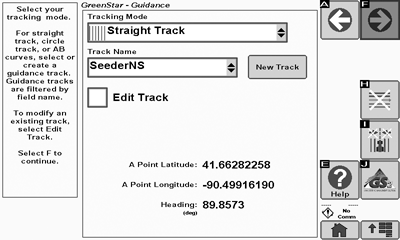
PC10857RR-UN-08OCT09
GreenStar Guidance
 While AutoTrac is activated, operator is responsible
for steering at end of path and collision avoidance. Do not attempt
to turn on (Activate) AutoTrac system while transporting on a roadway.
While AutoTrac is activated, operator is responsible
for steering at end of path and collision avoidance. Do not attempt
to turn on (Activate) AutoTrac system while transporting on a roadway.
Always turn off (Deactivate and Disable) AutoTrac system before entering a roadway. To turn off AutoTrac toggle STEER ON/OFF button until STEER OFF is displayed.
The final step of the Setup Wizard is creating, editing, or selecting a Guidance Track.
-
Select a Tracking Mode for Manual Guidance or AutoTrac. See the Operating Guidance sections for more information on Tracking Modes
-

PC10857KS-UN-14APR09Straight Track
Straight Track - Uses straight line parallel passes. -

PC10857KT-UN-14APR09AB Curves
AB Curves - Curves uses a manually driven curved path with two end points (beginning and end) to generate parallel passes. -

PC10857KU-UN-14APR09Adaptive Curves
Adaptive Curves - Uses a manually driven initial pass, then guides off of previous pass -

PC10857KV-UN-14APR09Circle Track
Circle Track (only available with Pivot Pro Activation) - Uses a center-pivot location to define concentric circles (tracks). -

PC10857MB-UN-14APR09Row Finder
Row Finder - Used in standing row-crop applications to mark end of a pass and guide operator to next pass.
If you do not wish to use Guidance, select Guidance OFF and select Next button.
-
-
If Straight Track, AB Curves or Circle Tracking Mode was selected, select a guidance track that is stored in the memory, or name a new Guidance track to be created.
Only the guidance tracks for the selected field appear in the list. If no field is selected, Global Tracks appear in the list or are created.
- Select the Edit Track checkbox if you selected a previously defined guidance track and would like to modify it.
-

PC10857KW-UN-14APR09Clear Shifts
Select Clear Shifts to clear all shifts associated with the selected track. -

PC10857XK-UN-16JUN10Delete Track
Select Delete Track to delete the selected track from memory.
-

PC10857JP-UN-13APR09Next
Select Next button.
See the OPERATING GUIDANCE section for the steps to create guidance tracks in each tracking mode.
|
OUO6050,000109D-19-20100616 |