GreenStar Run Page
PC10857QZ-UN-08OCT09
GreenStar Run Page

PC10857JI-UN-13APR09
RUN
A - Off Track Error
B - Track number
C - Guidance Icon
D - GPS Indicator
E - AutoTrac Status Pie
F - Interior Boundary
G - Swath Control Section Status Bar
H - Path Accuracy Indicator
I - Coverage
J - Exterior Boundary
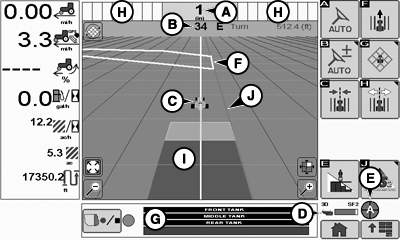
Use the Run page to operate Guidance and Mapping after the Setup Wizard is complete. Access the Run page by selecting RUN on the GreenStar MAIN page.Off Track Error (A) — Off Track error is numerically displayed in the box. Off Track error will be displayed in cm (inches) up to 99 cm (35 in.). If Off Track error exceeds 99 cm (35 in.), the distance displayed will change to meters (feet).
Track number (B) — Represents the track number the vehicle is guiding on. It also shows the direction that the track is located from the original Track 0 for the field.
Guidance Icon (C) — The icon represents the machine and implement in relative dimensions. The triangle on the machine represents the control point, which as used for guiding the machine and is defined by the machine offset measurements.
GPS Indicator (D) — Indicates what level of accuracy the StarFire receiver is currently operating at (3D, SF2, SF1, RTK). If using a GPS receiver other than a StarFire, the text 3D GPS will be displayed but the indicator bar will not fill.
AutoTrac Status Pie (E) — (See AutoTrac section)
Interior Boundary (F)
Swath Control Section Status Bar (G)
Path Accuracy Indicator (H) — Is a visual indicator of off-track error. The indicator consists of eight boxes on each side of the off-track error box. The boxes will light up indicating the direction the vehicle must be steered to get back on the AB line. Each arrow represents a distance (default is 10 cm (4 in.)). This distance and the steering direction may be defined on the Lightbar Settings Page.
Coverage (I)
Exterior Boundary (J)
Some softkeys only appear when the hardware or functions associated with those buttons are connected or available, such as the AutoTrac controls.

PC10857LA-UN-14APR09
AutoTrac Steer ON/OFF
AutoTrac Steer ON/OFF – Enables and disables AutoTrac

PC10857LB-UN-14APR09
Increase AutoTrac Steering Sensitivity
Increase AutoTrac Steering SensitivityThe Steering Sensitivity value may also be entered on the AutoTrac settings page.

PC10857LC-UN-14APR09
Decrease AutoTrac Steering Sensitivity
Decrease AutoTrac Steering Sensitivity

PC10857XJ-UN-16JUN10
Recording ON/OFF
Recording ON/OFF – Turns coverage recording ON and OFF when Manual recording source is selected.

PC10857JJ-UN-13APR09
Guidance Quick Change
Guidance Quick Change – Quickly go to the Guidance Setup page to create or modify a Guidance Track.

PC10857NC-UN-24SEP09
ShiftTrack
ShiftTrack – Go to the following Shift Track Controls. Shift Track is used to adjust position of machine left, center, or right of the set track. Shift track can be used to compensate for GPS drift. Drift is inherent to any satellite based, differentially corrected GPS system.

PC10857LE-UN-14APR09
Shift Track Left
Shift Track Left—Shifting the track left will shift all guidance tracks left.

PC10857LF-UN-14APR09
Shift Track Right
Shift Track Right—Shifting the track right will shift all guidance tracks right.

PC10857LG-UN-14APR09
Shift Track Center
Shift Track Center

PC10857LH-UN-14APR09
Clear Shifts
Clear Shifts

PC10857LI-UN-14APR09
Back button
Back to Run Page Softkeys

PC10857LJ-UN-14APR09
Map Controls
Map Controls – Go to the following Map Controls

PC10857LK-UN-14APR09
Toggle Mapping Mode
Toggle Mapping Mode

PC10857LM-UN-14APR09
Pan Map Up
Pan Map in the direction of the arrow.

PC10857LQ-UN-14APR09
Toggle Map Size
Toggle Map Size – Selecting this button increases the map to full screen, hiding the softkeys. Select the button again to decrease the maps size and show the softkeys.

PC10857LR-UN-14APR09
Zoom Out
Zoom Out

PC10857RA-UN-24SEP09
Zoom In
Zoom In

PC10857LT-UN-14APR09
Center Map
Center Map – Centers the map on the vehicle.

PC10857LU-UN-14APR09
Swath Control ON/OFF Toggle
Swath Control ON/OFF Toggle

PC10857JN-UN-13APR09
GreenStar Main Page
GreenStar – Go to GreenStar Main Page|
OUO6050,000109E-19-20100616 |