Recording a Straight Path or Navigating Around Obstacles
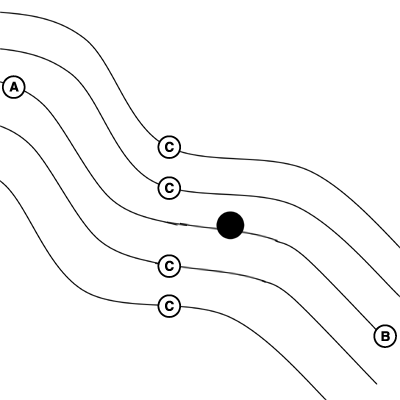
PC9030C-UN-27OCT06
A - Pause before obstacle
B - Resume after obstacle
C - Paths Generated from Track 0
-
Start AB Curves Recording
-
Select Pause Recording to temporary stop recording of a vehicle’s path.
-
Select AB Curves Recording to resume recording the AB curve.
The distance between where recording was PAUSED and RESUMED will be connected with a straight line. This can be helpful when there is a long straight section of path or when navigating around obstacles.
The longest bridge segment (line segment created between PAUSED and UNPAUSED) that can be created is a distance of 0.8 km (0.5 miles) (2,640ft). For a greater distance, the line segment will not connect resulting in a gap in the path.
|
OUO6050,00010B7-19-20090412 |