Guidance Settings

PC10857JN-UN-13APR09
GreenStar Main Page

PC10857JF-UN-13APR09
Settings

PC10857NG-UN-27APR09
Guidance Settings
Optimal performance of the GreenStar system usually requires adjustment of settings. Access Guidance settings to customize your user experience and optimize the system performance.
General Settings
Turning View - assists the operator view the next track when turning around. To turn ON/OFF, select / unselect check box.
Turn Predictor - alerts operator by predicting the end of pass. To turn ON/ OFF, select / unselect check box.
Tracking Tones – provide an audible indication off-track error. To turn ON/ OFF, select / unselect check box. To change distance at which tracking tones make a sound, select input field, select the desired value, and select Enter. Values between 10—60 cm (4—24 in.) may be entered.
Lead Compensation – shows how far down current track guidance looks to for such things as turns. It is used with Parallel Tracking only. To turn ON/OFF, select / unselect check box.
PC10857NH-UN-27APR09
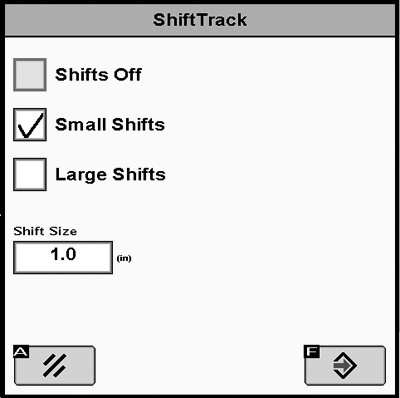
Shifts Off – Check the box to turn shifts OFF.
Small Shifts – Select Small Shifts to use a Shift Size of 1—30 cm (0.4—12 in.).
Large Shifts – Select Large Shifts to use a Shift Size of 1— 410cm (12-161.5 in.). Large Shifts are disabled when AutoTrac is active or when operating in Adaptive Curve Track mode.
Shift Size – Distance that tracks shift when SHIFT LEFT or SHIFT RIGHT buttons are selected.
|
OUO6050,00010D4-19-20100607 |