Auxiliary Controls—Preferred Assignments
PC10857TK-UN-01MAR10
Example:
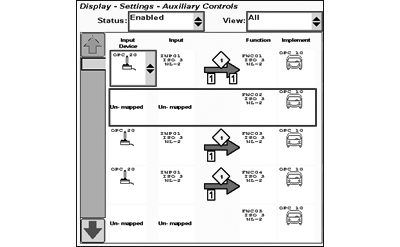
A joystick (4 inputs) and an implement (4 functions) are connected to the vehicle.
- Input 1 = function 1
- Input 2 = function 3
- Input 3 = function 2 and 4
- Input 4 = not assigned
In this example the implement requests function 3 to be mapped to input 2 and both functions 2 and 4 to be mapped on input 3. Input 4 remains blank.
This is called a preferred assignment and is requested by the implement as soon as implement and input device are connected. Once an assignment has been changed by the operator, the implement may store the mapping as the new preferred assignment for this particular configuration. If joystick and implement are disconnected and reconnected at a later date, the implement is able to reload the assignments again.
PC10857WM-UN-01JUN10
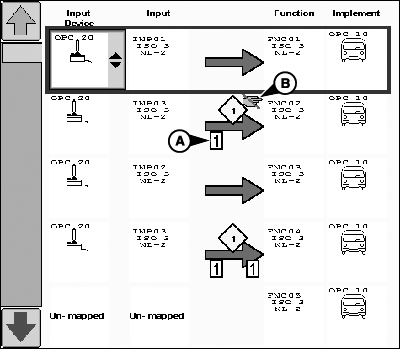
Display Settings - Auxiliary Controls
A - Single Assignment Icon
B - Assignment Lock Icon
Based on input device and/or implement requirements the assignments may be limited:-
The single assignment icon (A) can be set by an auxiliary function
and/or input.
- If an implement function sets a single assignment icon, it can only be mapped separately to ONE button of the input device and no additional function can be assigned to this button.
- If an input sets a single assignment icon, it can only be mapped to ONE implement function.
- The assignment lock icon (B) states that the assignment is requested automatically by the implement and can not be set manually by the operator.
Depending on the implement functions, the preferred assignment can also differ between the implement manufacturers.
|
OUO6050,0001244-19-20100601 |