SATELLITE INFORMATION softkey

PC8663-UN-05AUG05
MENU button

PC13006-UN-08NOV10
StarFire 3000 button

PC13048-UN-10NOV10
SATELLITE INFORMATION softkey
Press: MENU button >> StarFire 3000 button >> SATELLITE INFORMATION softkey.
The StarFire 3000 - Satellite Information screen contains SKY PLOT and GRAPH tabs.
PC12569-UN-14APR10
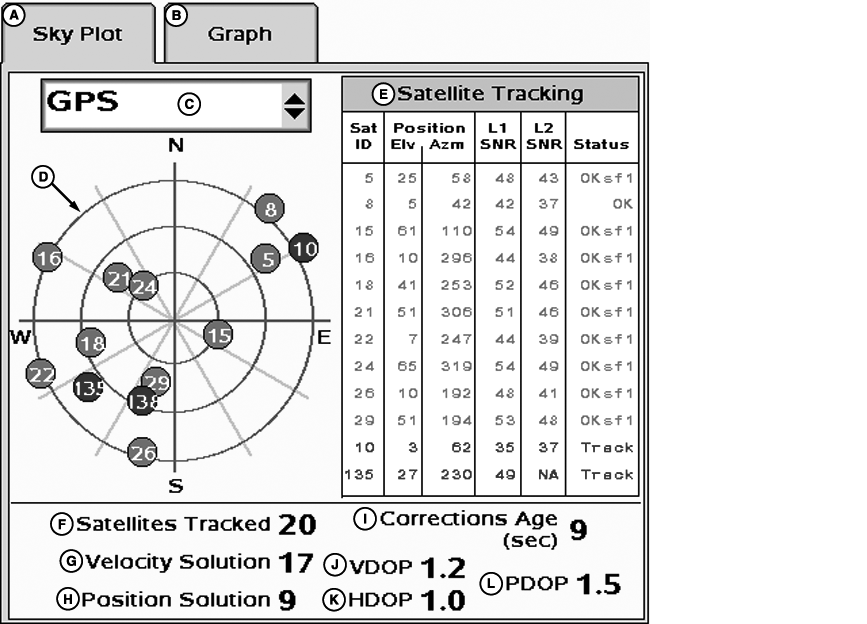
StarFire 3000 Satellite Skyplot
A - Sky Plot tab
B - Graph tab
C - Satellite Drop-down
D - Satellites on Sky Plot
E - Satellite Tracking
F - Satellites Tracked
G - Velocity Solution
H - Position Solution
I - Corrections Age
J - VDOP
K - HDOP
L - PDOP
PC12953-UN-02NOV10
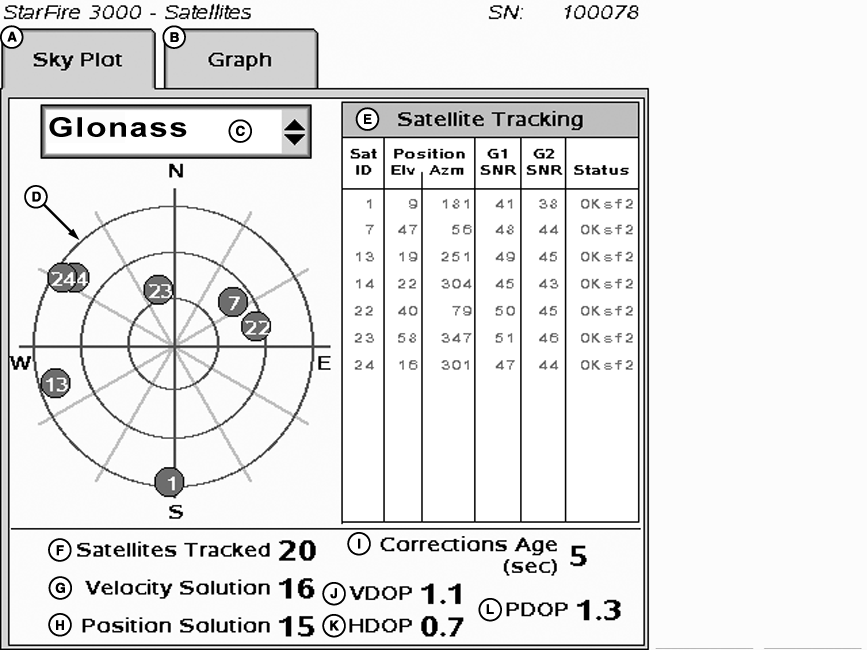
StarFire 3000 GLONASS Skyplot
A - Sky Plot tab
B - Graph tab
C - Satellite Drop-down
D - Satellites on Sky Plot
E - Satellite Tracking
F - Satellites Tracked
G - Velocity Solution
H - Position Solution
I - Corrections Age
J - VDOP
K - HDOP
L - PDOP
SKY PLOT tab
Illustrates where satellites are in relation to vehicles receiver. Sky Plot allows operator to look at satellite geometry.
The satellite information pages now show the number of satellites used in the Velocity Solution (G) and in the Position Solution (H). On previous receivers, only the number of satellites used in the Velocity Solution was displayed. The Position Solution uses only data with the highest confidence levels in order to calculate the receiver’s true position. The Velocity Solution uses data from as many satellites as possible to calculate intermediate values based on the previously calculated position solution. As a result, the Velocity Solution count will usually display a higher number of satellites than the Position Solution.
Reading Satellite Sky Plot
- Sky Plot is fixed so that North is always at top.
-
Satellites are displayed as their satellite ID number that correspond
to Satellite Tracking Chart located right of Sky Plot
- Red – indicates satellite is in search mode
- Blue – indicates satellite is being tracked
- Green – indicates satellite is OK (being used for corrections)
- Sky Plot consists of 3 concentric rings depicting 0, 30, and 60 degrees of elevation with directional crossbar intersection representing 90 degrees of elevation.
- Gray radial lines extending from center of Sky Plot represent azimuth. They are spaced 30 degrees apart and represent 30 and 60 degrees.
- Directional crossbar representing North, South, East, and West also represent azimuth at 0, 90, 180, and 270 degrees.
Satellite Tracking Chart
- SAT ID – (Satellite Identification Number) Identification number for GPS Satellite.
- ELV – (Position Elevation) Elevation in degrees above horizon for GPS satellite position
- AZM – (Position Azimuth) Azimuth in degrees from true North for GPS satellite
- L1 SNR – (L1 Signal to Noise Ratio) Signal strength for L1 GPS signal (signal to noise ratio)
- L2 SNR – (L2 Signal to Noise Ratio) Signal strength for L2 GPS signal (signal to noise ratio)
- G1 SNR – (G1 Signal to Noise Ratio) Signal strength for G1 GLONASS signal (signal to noise ratio)
- G2 SNR – (G2 Signal to Noise Ratio) Signal strength for G2 GLONASS signal (signal to noise ratio)
-
Status – (GPS Signal Status) Status of GPS signal
- Search – searching for satellite signal
- Track – tracking satellite signal and using it for positioning
- OK – tracking satellite signal and using it for positioning
- OK SF1 – Tracking satellite signal and using it for positioning with StarFire single frequency
- OK SF2 – Tracking satellite signal and using it for positioning with StarFire dual frequency
- OK RTK – Tracking satellite signal and using it for positioning with StarFire RTK signal
Satellite Tracking Information
Satellite Tracking information is displayed at bottom of SKY PLOT and GRAPH tabs.
- Satellites in Solution – number of satellites used to compute position.
- Satellites Above Elevation Mask – total number of GPS satellites available to receiver that are above 5 degree elevation mask.
- Satellites Tracked – total number of GPS satellites tracked by receiver.
- Corrections Age (seconds) – age of differential correction signal to GPS (normally less than 10 seconds)
- VDOP – Vertical Dilution of Precision
- HDOP – Horizontal Dilution of Precision
- PDOP – Positional Dilution of Precision is an indicator of GPS satellite geometry as viewed by receiver. A lower PDOP indicates better satellite geometry for calculating both horizontal and vertical position.
PC12570-UN-15APR10
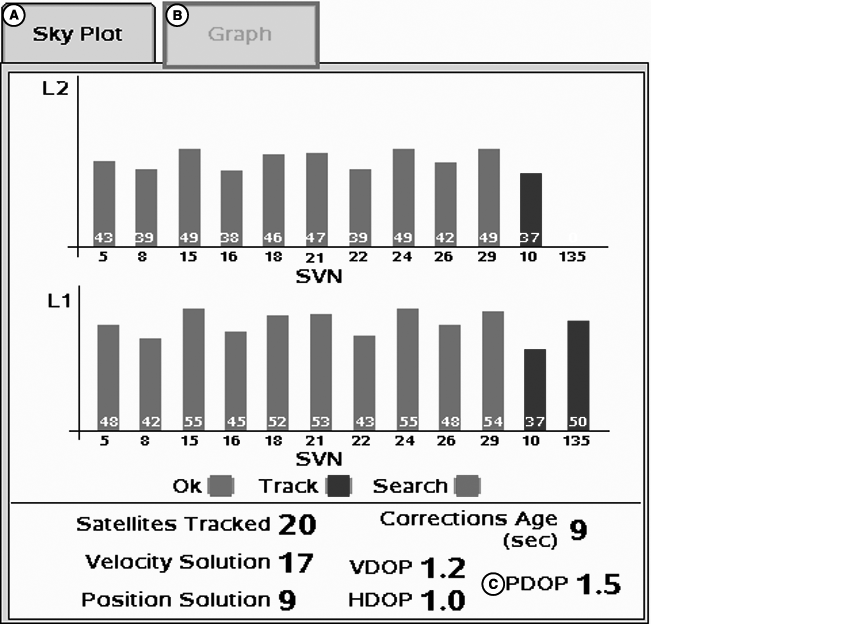
StarFire 3000 Satellite Graph
A - SkyPlot tab
B - Graph tab
D - PDOP
PC12572-UN-15APR10
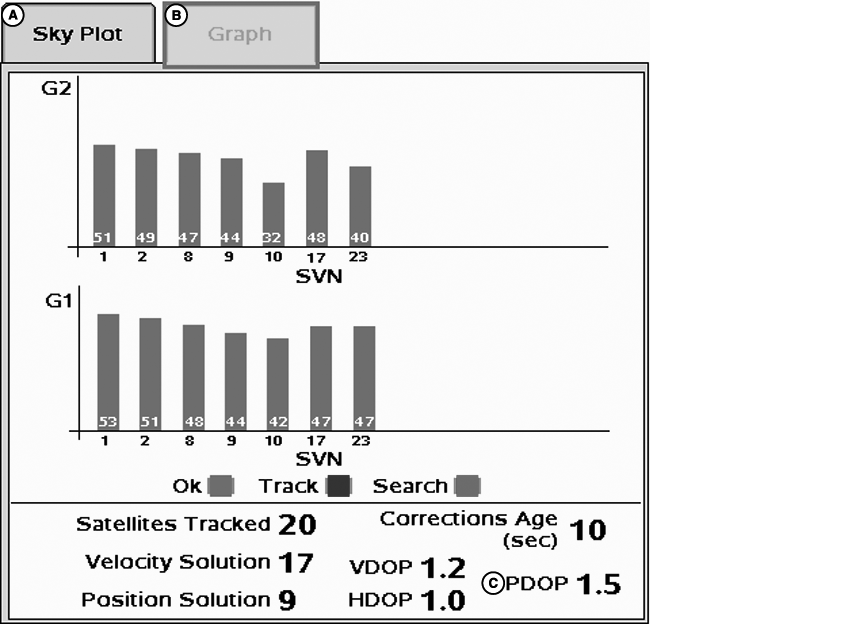
StarFire 3000 GLONASS Graph
Graph
A graph illustrating L1 and L2 (G1 and G2 for GLONASS satellites) SNR values.
- Bars are colored to satellites current status.
- SNR values (colored bar) are above dashed line running horizontally across the bar graph.
NOTE: ONLY GREEN bars are used in calculation of PDOP, VDOP, AND HDOP. SNR's are considered good when above dashed line.
|
CF86321,000004A-19-20110404 |