Alarm Setup
PC14136-UN-31OCT11
Alarm Setup
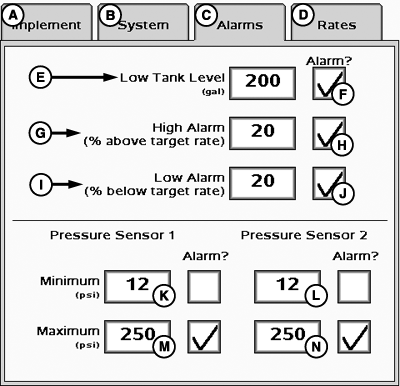
A - Implement Tab
B - System Tab
C - Alarms Tab
D - Rates Tab
E - Low Tank Level Input Box
F - Low Tank Level Alarm Enable/Disable
G - High Alarm Input Box (% Above Target Rate)
H - High Alarm Enable/Disable
I - Low Alarm Input Box (% Below Target Rate)
J - Low Alarm Enable/Disable
K - Pressure Sensor 1 Minimum Pressure Input Box
L - Pressure Sensor 2 Minimum Pressure Input Box
M - Pressure Sensor 1 Maximum Pressure Input Box
N - Pressure Sensor 2 Maximum Pressure Input Box
Select Alarms tab (C) to enter alarm setup.
Low tank level, high alarm, low alarm, minimum pressure, and maximum pressure alarms can be toggled on or off via the enable/disable boxes.
Values for the seven alarms may be defined by entering values in the boxes.
NOTE: Minimum and Maximum Pressure alarms are disabled if not configured with a pressure sensor.
|
BA31779,00002AA-19-20111031 |