Alarms Setup
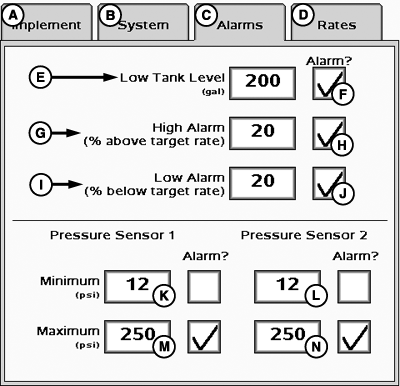
Select the Alarms tab to enter Alarms setup.
PC14136-UN-31OCT11
A - Implement Tab
B - System Tab
C - Alarms Tab
D - Rates Tab
E - Low Tank Level Input Box
F - Low Tank Level Alarm Enable/Disable
G - High Alarm Input Box (% Above Target Rate)
H - High Alarm Enable/Disable
I - Low Alarm Input Box (% Below Target Rate)
J - Low Alarm Enable/Disable
K - Pressure Sensor 1 Minimum Pressure Input Box
L - Pressure Sensor 2 Minimum Pressure Input Box
M - Pressure Sensor 1 Maximum Pressure Input Box
N - Pressure Sensor 2 Maximum Pressure Input Box
Low tank level, high alarm, low alarm, minimum pressure, and maximum pressure alarms can be toggled on or off via the enable/disable boxes.
Values for the seven alarms may be defined by entering the figure in the numeric entry boxes.
NOTE: Minimum and Maximum Pressure alarms are disabled if not configured with a pressure sensor.
|
BA31779,00002AB-19-20111103 |