GreenStar Rate Controller Main Page
PC14150-UN-01NOV11
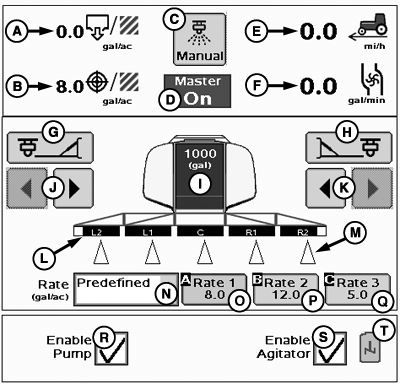
GreenStar Rate Controller Main Page
A - Actual Rate
B - Target Rate
C - Manual Spray Button
D - Master Switch Indicator/Implement Height Switch Indicator
E - Travel Speed
F - Flow (Volume per Time)
G - Left Fence Row Nozzle On/Off Button
H - Right Fence Row Nozzle On/Off Button
I - Estimated Volume Remaining/Tank Refill Button
J - Left Side Section On/Off Buttons
K - Right Side Section On/Off Buttons
L - Implement Sections
M - Section Status Indicators
N - Rate Selection Drop-Down Menu
O - Predefined Rate 1
P - Predefined Rate 2
Q - Predefined Rate 3
R - Enable Pump
S - Agitator Enable/Disable
T - Agitator Status Icon
NOTE: Pressure (F): Pressure from pressure sensor 1 will be displayed instead of flow if system is configured for a pressure sensor.
Enable Pump (R): Information drop-down menu will be displayed if Pump Enable was not selected in PWM Settings.
|
BA31779,00002AE-19-20111103 |